


158
社区成员
 发帖
发帖 与我相关
与我相关 我的任务
我的任务
 分享
分享————102101328林驰易
| 这个作业属于哪个课程 | https://bbs.csdn.net/forums/ssynkqtd-05 |
|---|---|
| 这个作业要求在哪里 | https://bbs.csdn.net/topics/617377308 |
| 这个作业的目标 | 完成一个前后端交互的科学计算器 |
| 其他参考文献 | https://uniapp.dcloud.net.cn/component/ |


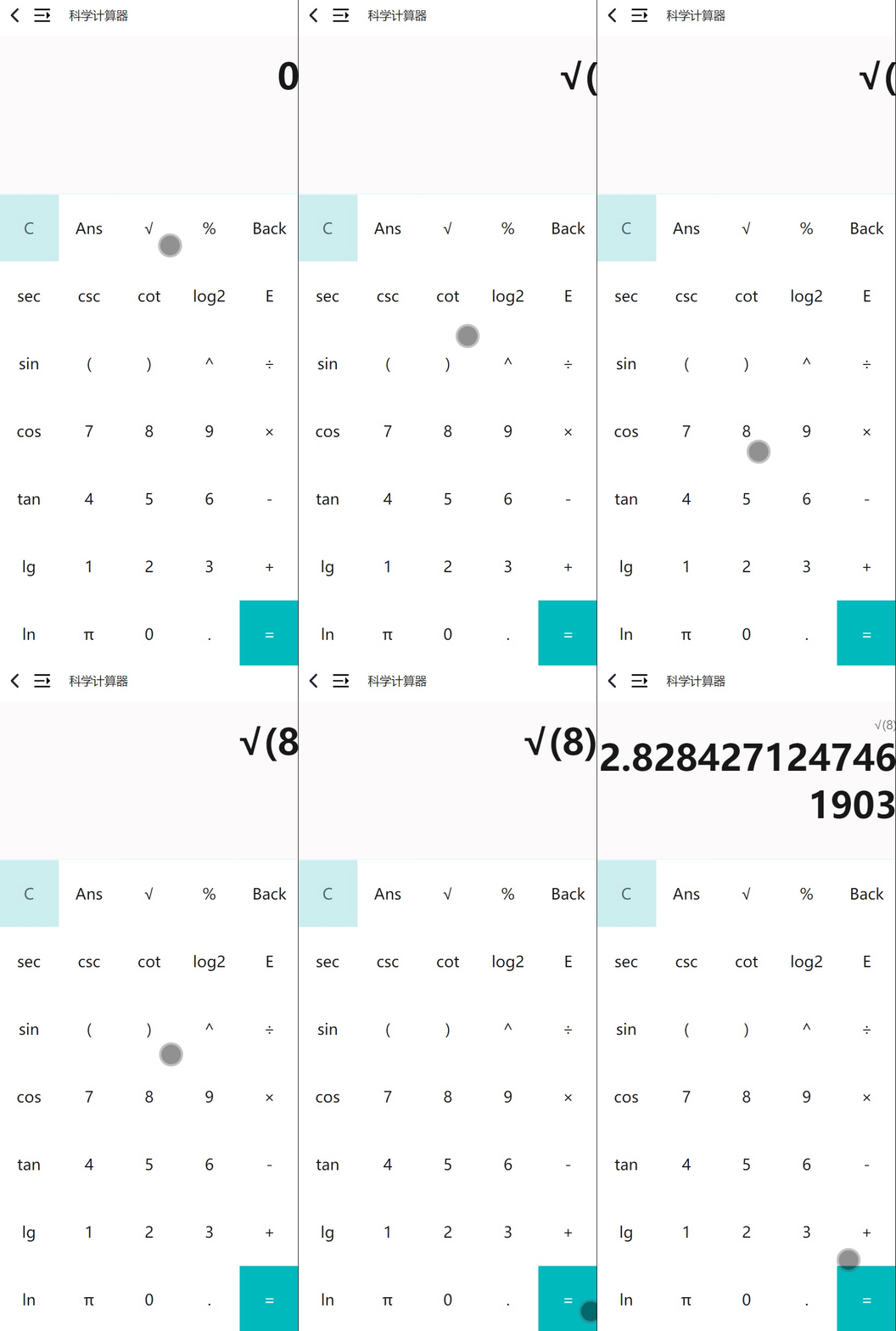
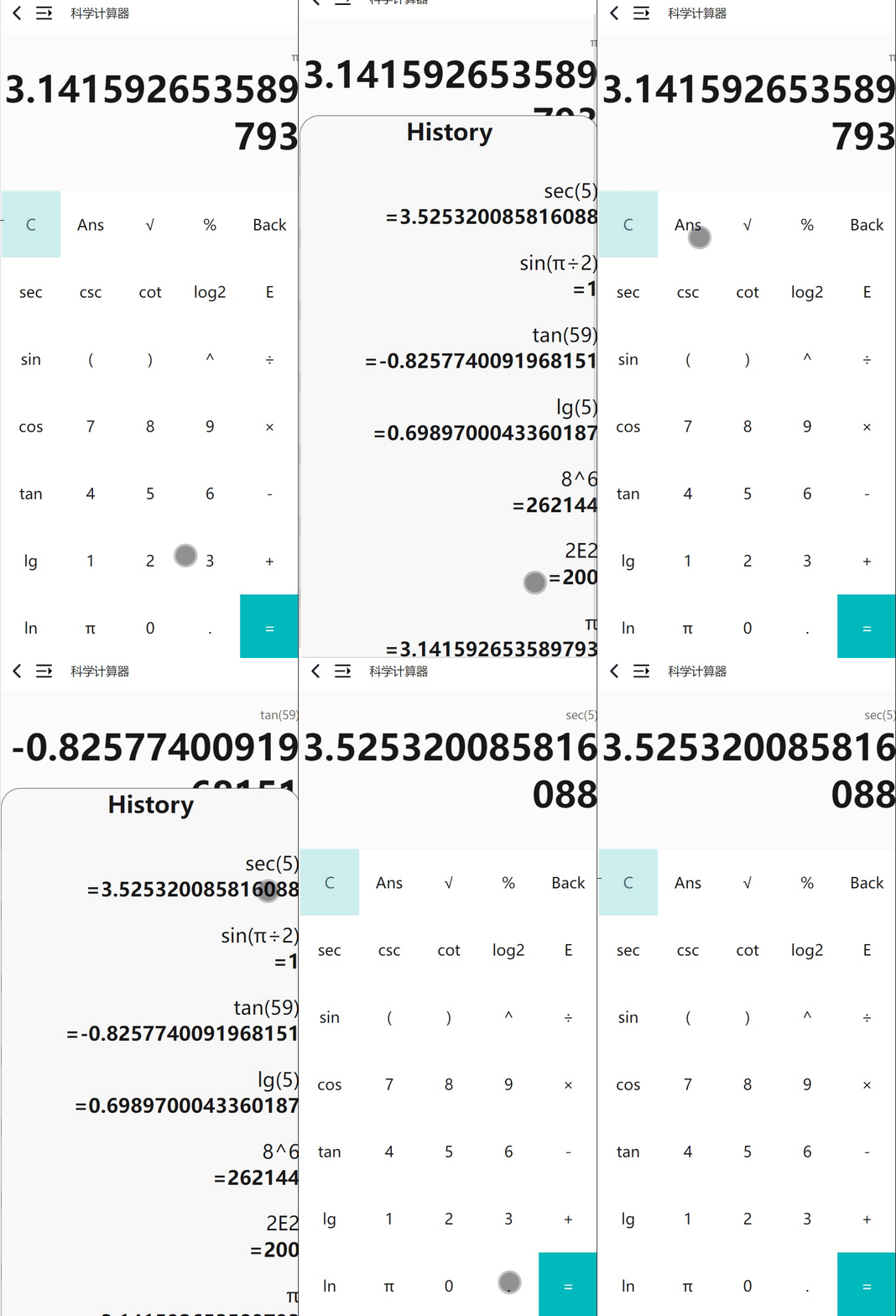
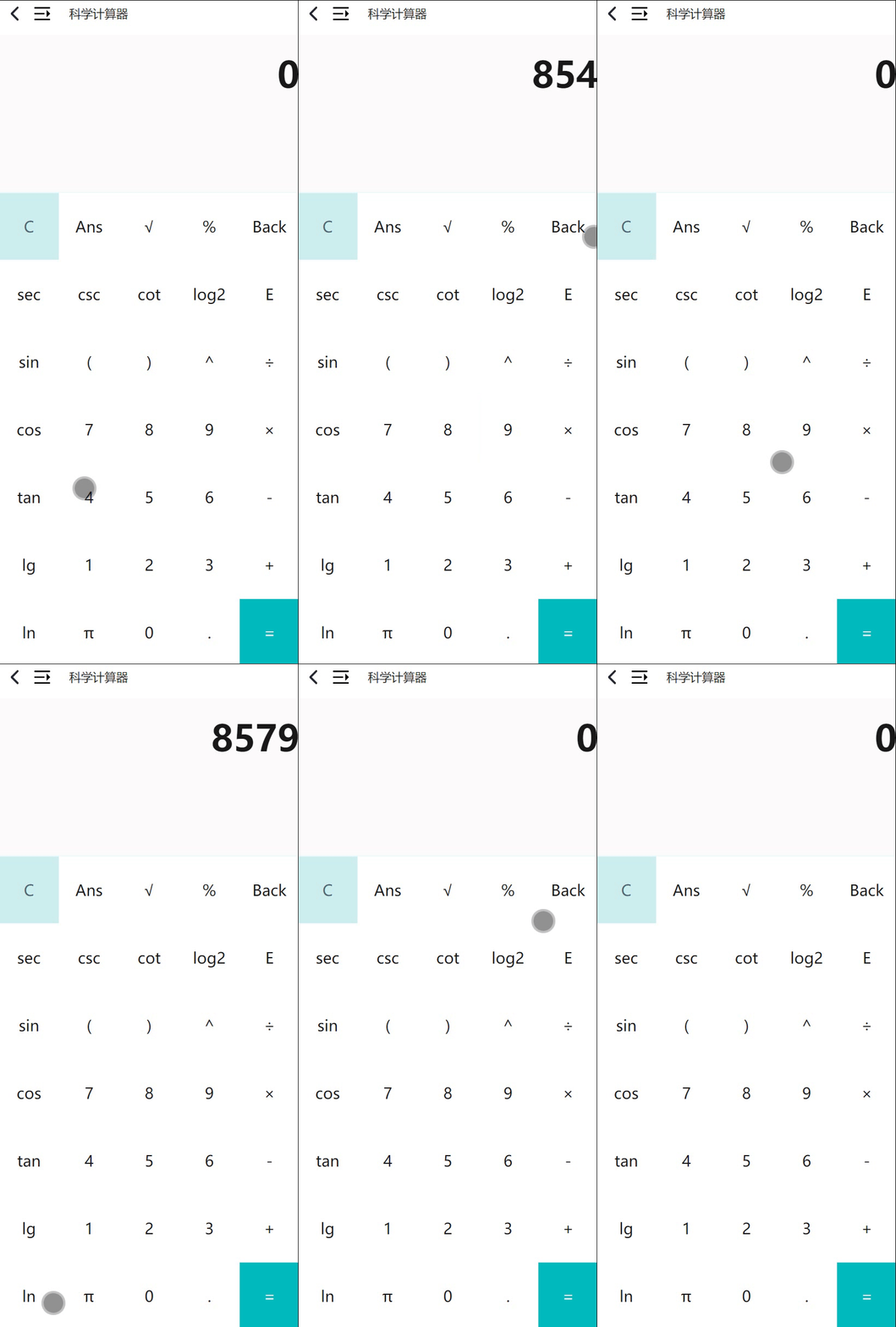

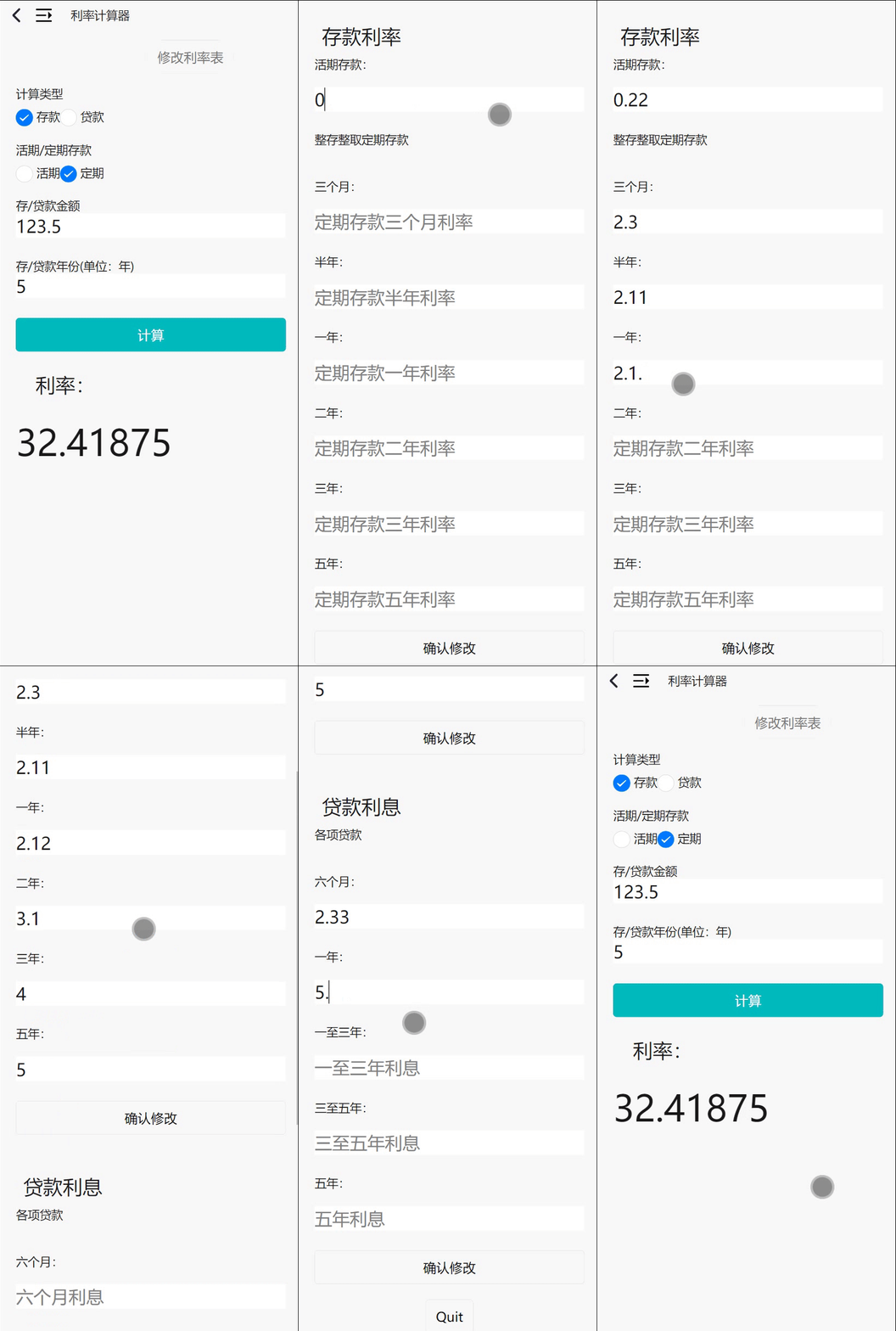
修改前:
存款利率:

借款利息:

修改后:
存款利率:

借款利息:

| PSP | Personal Software Process Stages | 预估耗时(分钟) | 实际耗时(分钟) |
|---|---|---|---|
| Planning | 计划 | 15 | 10 |
| • Estimate | • 估计这个任务需要多少时间 | 10 | 5 |
| Development | 开发 | 720 | 700 |
| • Analysis | • 需求分析 (包括学习新技术) | 60 | 80 |
| • Design Spec | • 生成设计文档 | 40 | 25 |
| • Design Review | • 设计复审 | 5 | 5 |
| • Coding Standard | • 代码规范 (为目前的开发制定合适的规范) | 10 | 10 |
| • Design | • 具体设计 | 60 | 75 |
| • Coding | • 具体编码 | 360 | 420 |
| • Code Review | • 代码复审 | 120 | 120 |
| • Test | • 测试(自我测试,修改代码,提交修改) | 100 | 120 |
| Reporting | 报告 | 30 | 45 |
| • Test Repor | • 测试报告 | 20 | 20 |
| • Size Measurement | • 计算工作量 | 10 | 7 |
| • Postmortem & Process Improvement Plan | • 事后总结, 并提出过程改进计划 | 12 | 10 |
| 合计 | 1572 | 1652 |
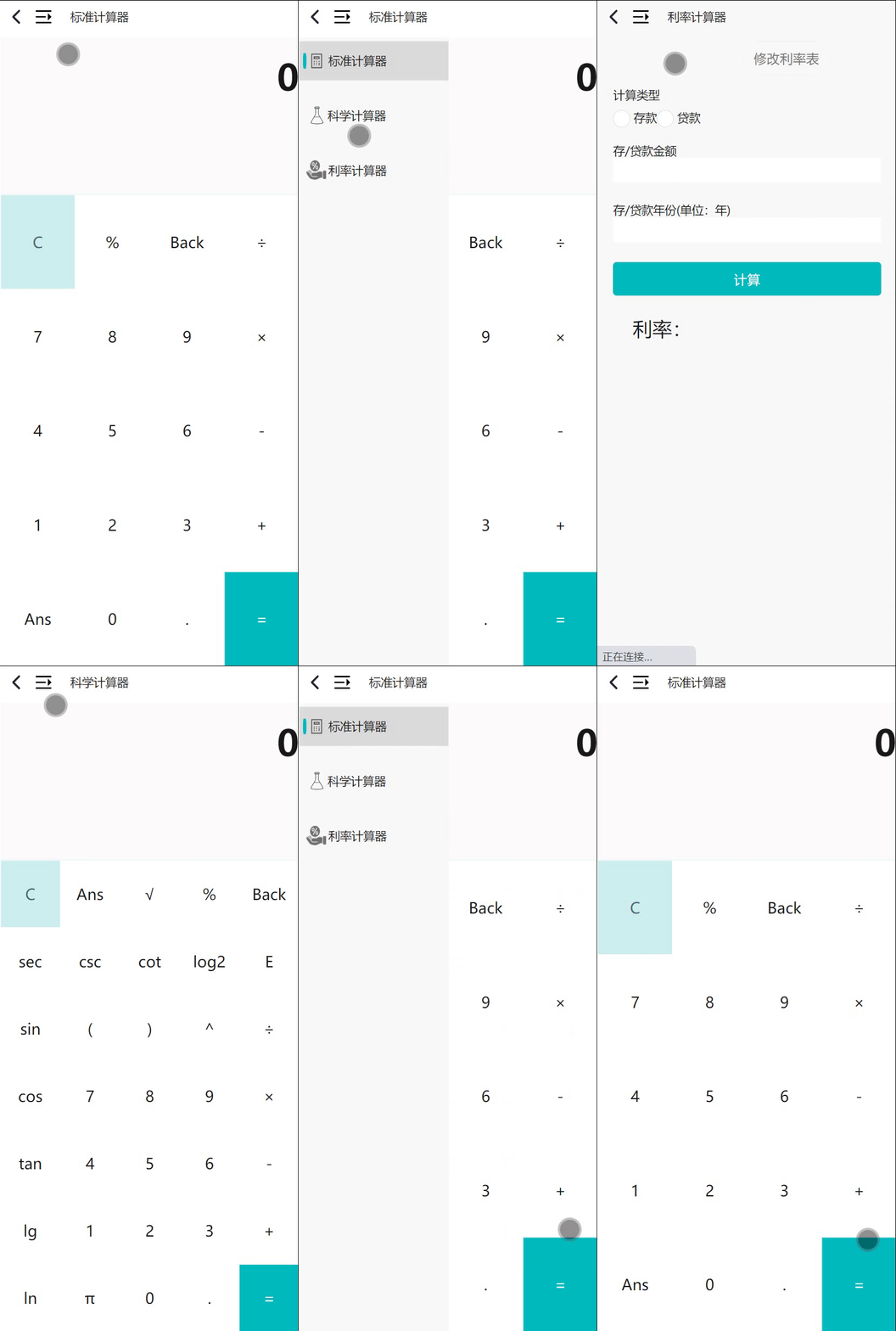
利用Hbuilderx可以实现Android、小程序、ios的多端开发。但为了适应计算器的界面,选择了Android的开发。
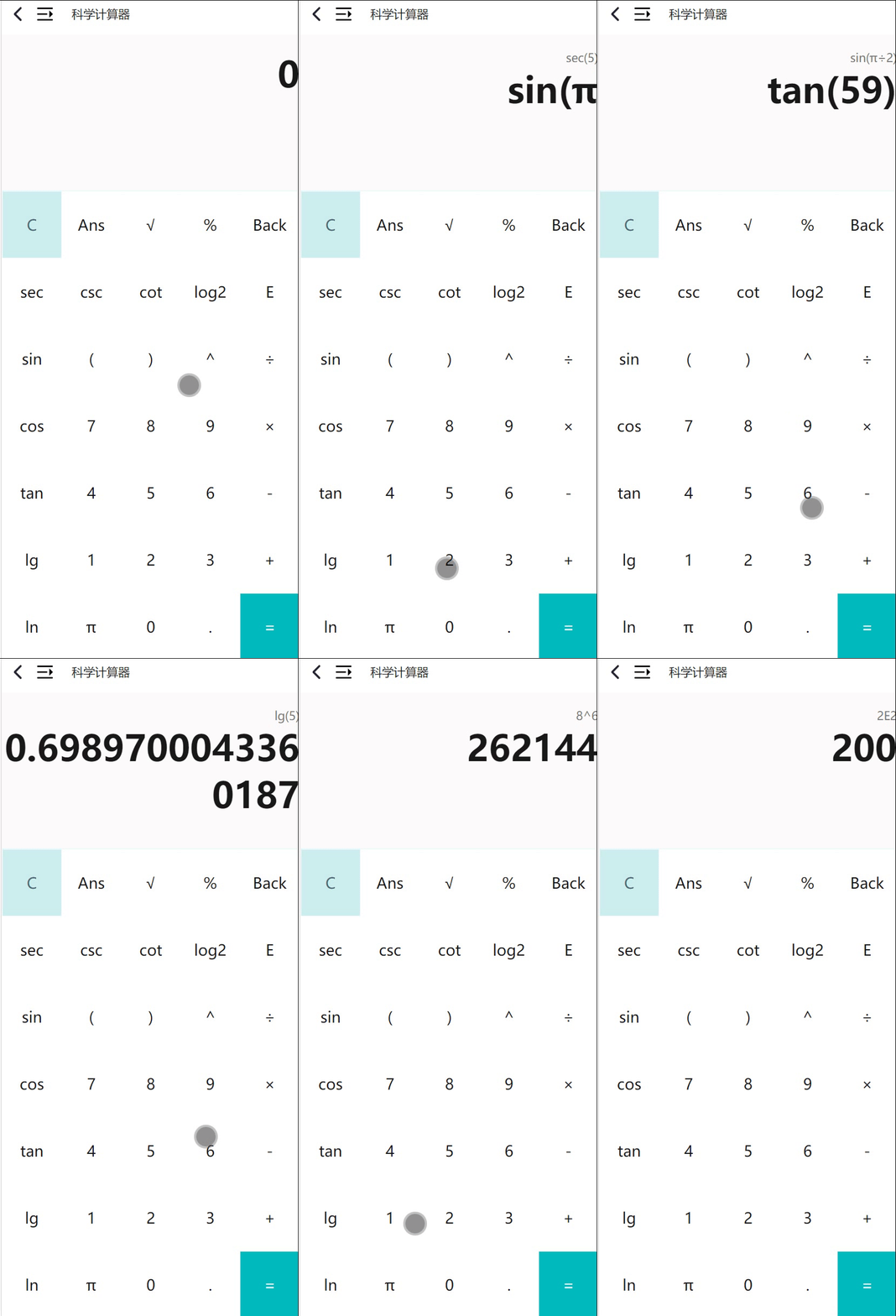
此次作业开发使用了html+css+js开发,其中主要的代码都写在vue文件中。开发的主要思路是利用在vue文件中添加一系列组件,并利用css渲染,并对组件添加一系列js函数以实现反馈:
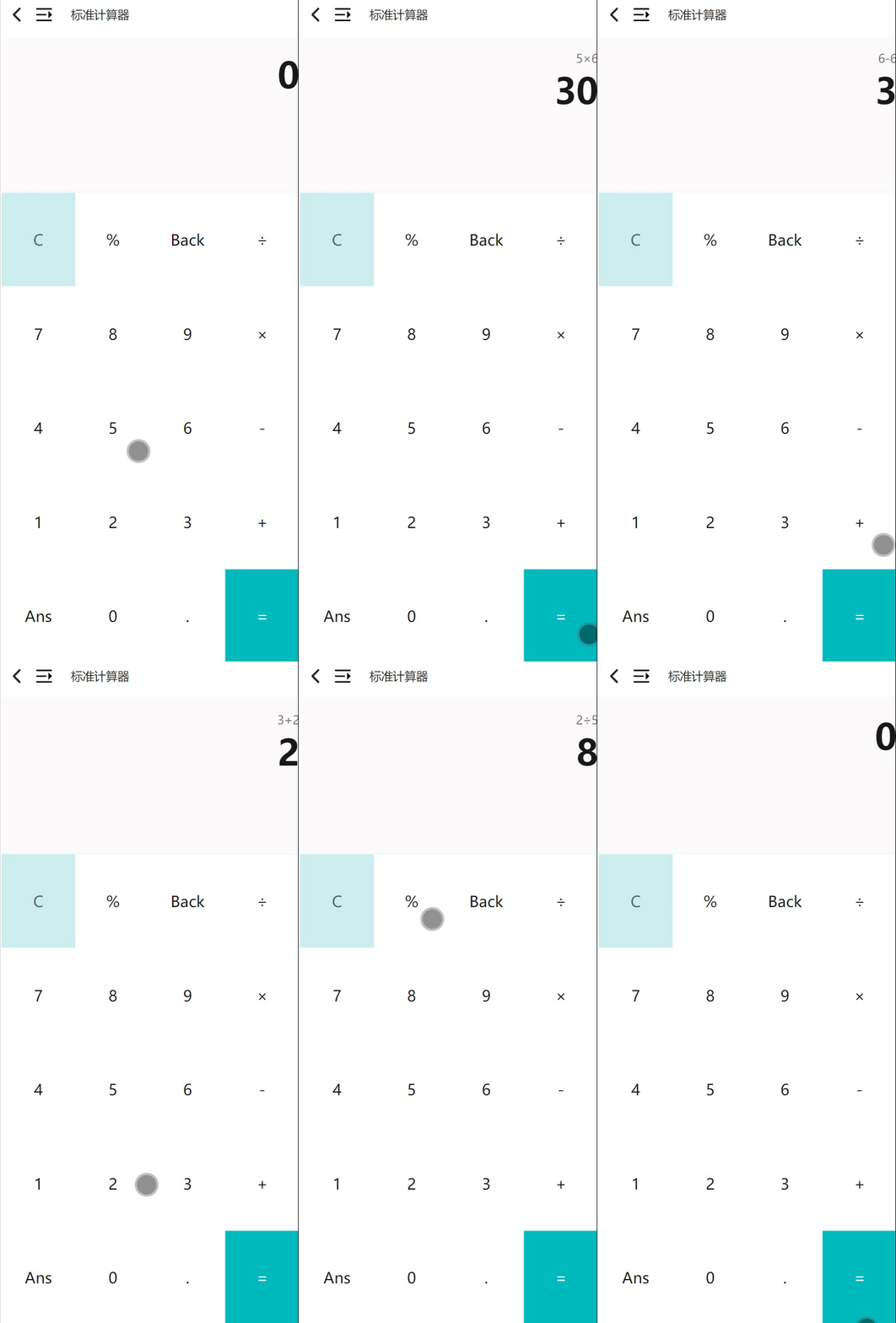
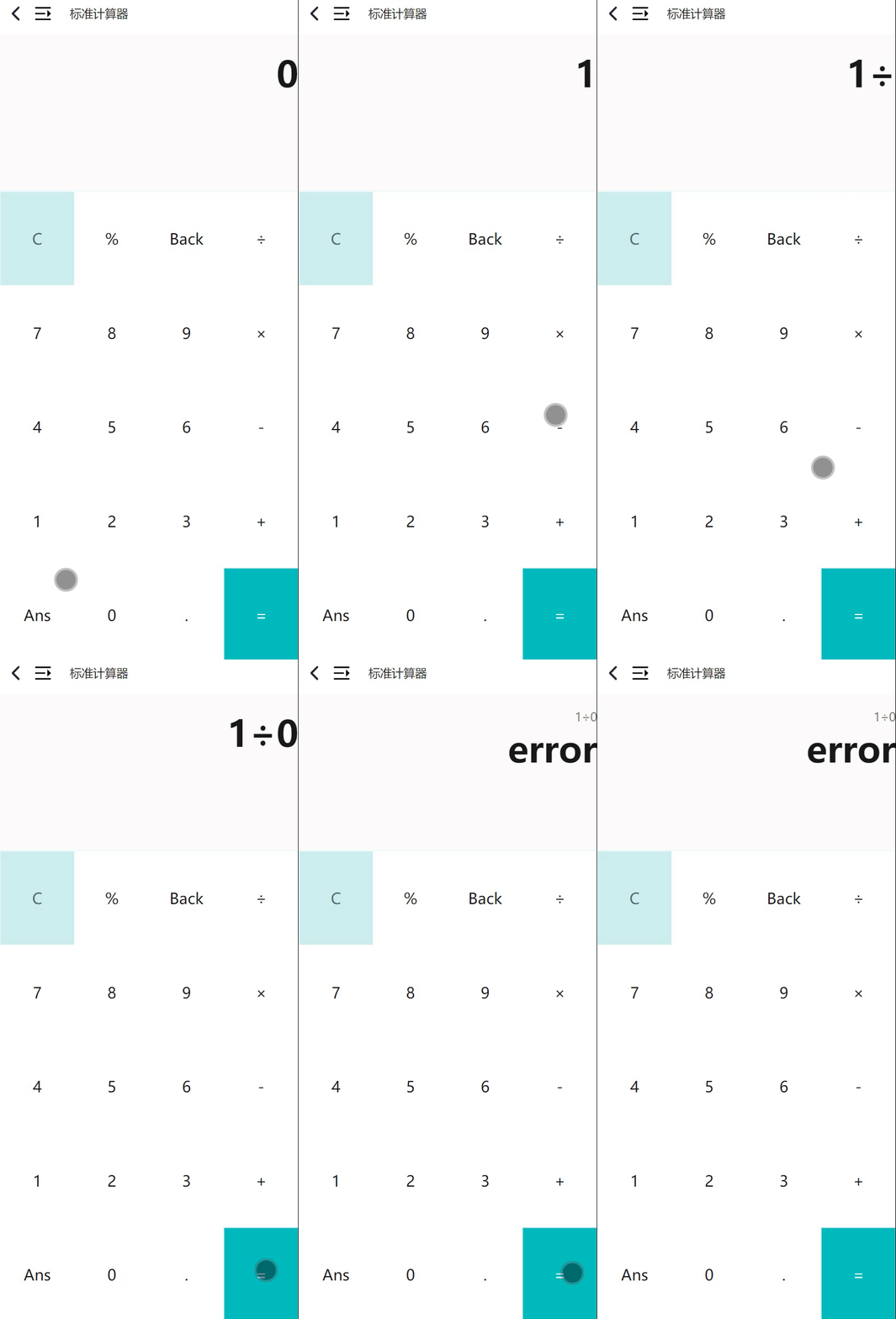
对计算器的按钮添加click_buttom函数,当按下对应的按钮时,屏幕上的calculate_string和ans会相应发生改变。同时前端利用fetch向后端服务器发送运算数据和接受后端服务器发来的结果数据,并根据发送过来的数据修改屏幕上的结果。
后端主要是利用go语言的gin和gorm框架。
利用gin框架处理前端发送过来的数据请求,经过运算逻辑运算后将结果返回给前端。
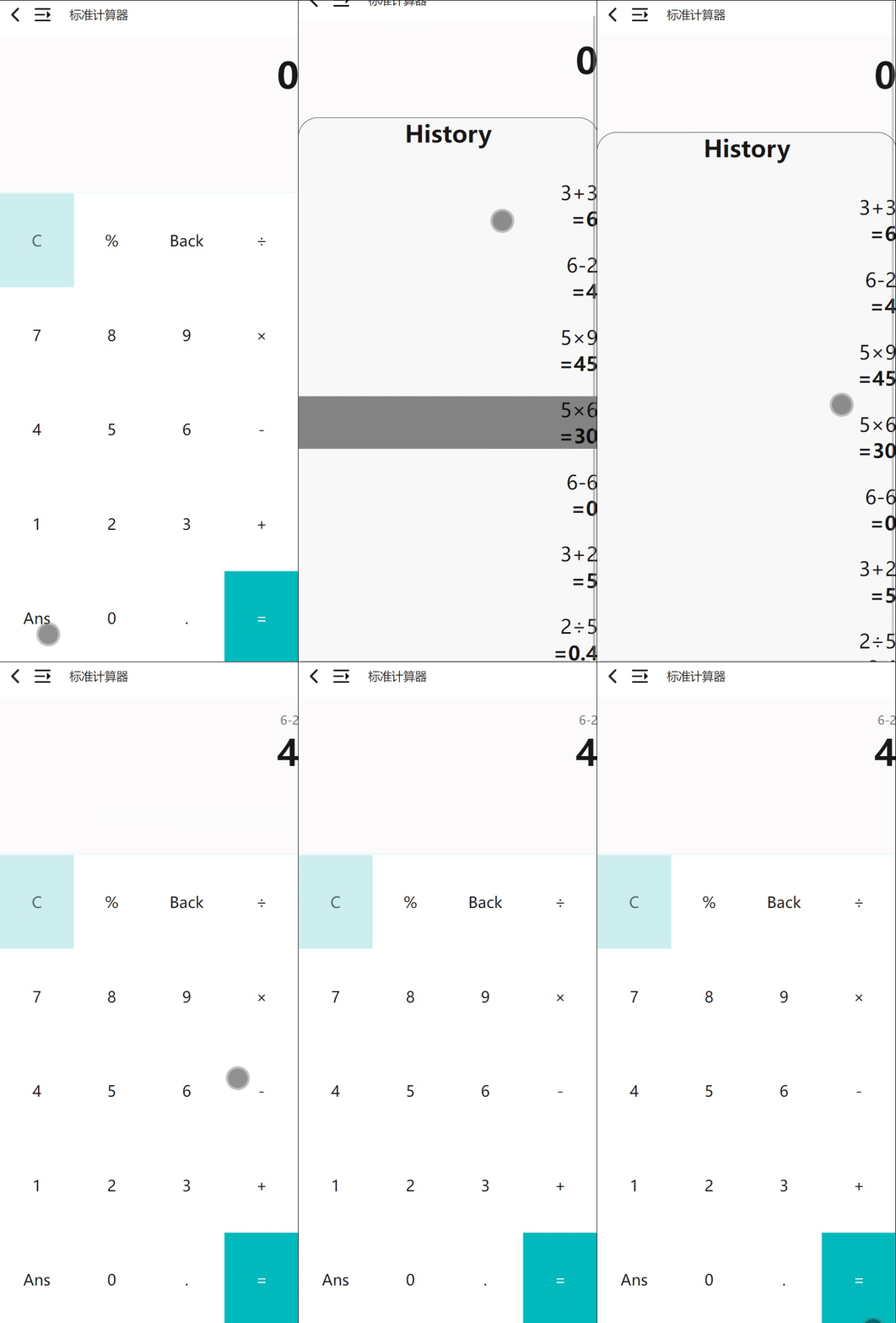
利用gorm处理数据库。当前端发送来运算数据时,后端将其存入数据库中。之后当前端发送来运算指令时,后端从数据库中取出运算数据,经过运算模块进行一系列运算后发送给前端,并将相应记录保存到数据库中,以便后续对历史记录的访问。
通过在pages.json中定义出三个页面,分别对应三个计算器
    "pages": [ //pages数组中第一项表示应用启动页,参考:https://uniapp.dcloud.io/collocation/pages

        {
            "path": "pages/calculate/calculate",
            "style": {
                "navigationStyle": "custom",
                "navigationBarTitleText": "标准计算器"
            }
        },
        {
            "path": "pages/science/science",
            "style": {
                "navigationStyle": "custom",
                "navigationBarTitleText": "科学计算器"
            }
        },
        {
            "path": "pages/bonus/bonus",
            "style": {
                "navigationStyle": "custom",
                "navigationBarTitleText": "利率计算器"
            }
        }
    ],
三个页面对应代码:
标准计算器:
<template>
    <view class="content" >

        <MyNavigationbarVue title="标准计算器" :is_show_temp="is_show" @sendback="getNewData"/>


        <view class="screen" @click="menu_hide">
            <view class="calculate_string_area">
                {{calculate_string}}
            </view>
            <view class="ans_area">
                {{ans}}
            </view>
        </view>

        <view class="button_group">
            <view v-for="(item,index) in button_items" :key="index" class="button_item"
            :id="item.id" hover-class="hover_button_item" hover-stay-time="1.5s" @click="click_button(item)">
                {{item.value}}
            </view>
        </view>

        <view class="history_list" :hidden="history_hide">
            <view class="history_title">
                <h1>History</h1>
            </view>
            <view class="history_item_group">
                <view class="history_item" v-for="(item,index) in history_list" :key="index"
                hover-class="hover_item" hover-stay-time="1.5s" @click="get_history_item(item)">
                    {{ item.calc_s}}
                    <p class="cu">={{item.ans}}</p>
                </view>
            </view>

        </view>

    </view>
</template>
科学计算器:
<template>
    <view class="content" >

        <MyNavigationbarVue title="科学计算器" :is_show_temp="is_show" @sendback="getNewData"/>


        <view class="screen" @click="menu_hide">
            <view class="calculate_string_area">
                {{calculate_string}}
            </view>
            <view class="ans_area">
                {{ans}}
            </view>
        </view>

        <view class="button_group" >
            <view v-for="(item,index) in button_items" :key="index" class="button_item"
            :id="item.id" hover-class="hover_button_item" hover-stay-time="1.5s" @click="click_button(item)">
                {{item.value}}
            </view>
        </view>


        <view class="history_list" :hidden="history_hide">
            <view class="history_title">
                <h1>History</h1>
            </view>
            <view class="history_item_group">
                <view class="history_item" v-for="(item,index) in history_list" :key="index"
                hover-class="hover_item" hover-stay-time="1.5s" @click="get_history_item(item)">
                    {{ item.calc_s}}
                    <p class="cu">={{item.ans}}</p>
                </view>
            </view>

        </view>

    </view>
</template>
利率计算器:
<template>
    <view class="content bg_color">
        <MyNavigationbarVue title="利率计算器" :is_show_temp="is_show" @sendback="getNewData"/>
        <view class="bonus_table" v-if="bonus_table">
            <view class="save_bonus">
                <view style="font-size: 50rpx; margin: 20rpx;">
                    存款利率
                </view>
                <form @submit="edit_save_bonus">
                    <view class="bonus_txt">
                        活期存款:
                    </view>
                    <input class="uni-input" type="number" placeholder="活期存款利率" v-model="alive_bonus" />
                    <view class="bonus_txt">
                        整存整取定期存款
                    </view><br>
                    <view class="bonus_txt">
                        三个月:
                    </view>
                    <input class="uni-input" placeholder="定期存款三个月利率" v-model="three_month_save_bonus"/>
                    <view class="bonus_txt">
                        半年:
                    </view>
                    <input class="uni-input" placeholder="定期存款半年利率" v-model="half_year_save_bonus"/>
                    <view class="bonus_txt">
                        一年:
                    </view>
                    <input class="uni-input" placeholder="定期存款一年利率" v-model="a_year_save_bonus"/>
                    <view class="bonus_txt">
                        二年:
                    </view>
                    <input class="uni-input" placeholder="定期存款二年利率" v-model="two_year_save_bonus"/>
                    <view class="bonus_txt">
                        三年:
                    </view>
                    <input class="uni-input" placeholder="定期存款三年利率" v-model="three_year_save_bonus"/>
                    <view class="bonus_txt">
                        五年:
                    </view>
                    <input class="uni-input" placeholder="定期存款五年利率" v-model="five_year_save_bonus"/>
                    <button form-type="submit">确认修改</button>
                </form>
            </view>
            <view class="borrow_bonus">
                <view style="font-size: 50rpx; margin: 20rpx;">
                    贷款利息
                </view>
                <form @submit="edit_borrow_bonus">
                    <view class="bonus_txt">
                        各项贷款
                    </view><br>
                    <view class="bonus_txt">
                        六个月:
                    </view>
                    <input class="uni-input" placeholder="六个月利息" v-model="interest_1"/>
                    <view class="bonus_txt">
                        一年:
                    </view>
                    <input class="uni-input" placeholder="六个月利息" v-model="interest_2"/>
                    <view class="bonus_txt">
                        一至三年:
                    </view>
                    <input class="uni-input" placeholder="一至三年利息" v-model="interest_3"/>
                    <view class="bonus_txt">
                        三至五年:
                    </view>
                    <input class="uni-input" placeholder="三至五年利息" v-model="interest_4"/>
                    <view class="bonus_txt">
                        五年:
                    </view>
                    <input class="uni-input" placeholder="五年利息" v-model="interest_5"/>
                    <button form-type="submit">确认修改</button>
                </form>
            </view>
            <button @click="shut_down">Quit</button>
        </view>
        <button class="change_bonus" @click="bonus_table_show()">修改利率表</button>
        <view class="bonus_calc" style="padding: 40rpx;">
            <form @submit="bonus_calc">
                <view class="uni-form-item uni-column">
                    <view class="title">计算类型</view>
                        <radio-group name="radio" @change="radioChange">
                            <label>
                                <radio value="save" class="botton_dis"/><text>存款</text>
                            </label>
                            <label>
                                <radio value="borrow" class="botton_dis"/><text>贷款</text>
                            </label>
                        </radio-group>
                </view>
                <view class="uni-form-item uni-column" v-if="select_option==='save'">
                    <view class="title">活期/定期存款</view>
                        <radio-group name="radio" @change="radioChange2">
                            <label>
                                <radio value="alive" class="botton_dis"/><text>活期</text>
                            </label>
                            <label>
                                <radio value="dead" class="botton_dis"/><text>定期</text>
                            </label>
                        </radio-group>
                </view>
                <view class="input_box">
                    <label class="inputTxt">存/贷款金额</label>
                    <input type="text" class="uni-input" v-model="money">
                    <label class="inputTxt">存/贷款年份(单位:年)</label>
                    <input type="text" class="uni-input" v-model="years">
                </view>
                <button form-type="submit" class="btn_calc">计算</button>
            </form>
            <p style="font-size: 50rpx; margin: 50rpx;">利率:</p>
            <view class="ans_area">
                {{ans}}
            </view>
        </view>
    </view>
</template>
引入自定义组件MyNavigationbar以实现顶部的导航栏和界面切换的侧边栏,不同的页面会传递不同的参数给MyNavigationbar,后者根据不同的参数渲染出不同的页面
<template>
    <view>
        <view class="status_bar">
            <!-- 这里是状态栏 -->
        </view>
        <view class="navBar" style="height:93rpx;">
             <view  style="display: flex; flex-direction: row;align-items: center;">
                 <image src="../static/back.png" style="height: 80rpx;width: 80rpx;" @click="goback"></image>
                <image src="../static/menu.png" style="height: 60rpx;width: 60rpx; margin-right: 40rpx;" @click="menu_show"></image>
                <p style="line-height: 80rpx;">{{title}}</p>
             </view>
        </view>


        <view class="menu_content" :hidden="is_show_temp">

            <!-- <view :hidden="title === '科学计算器' "> -->
            <view v-if="title === '标准计算器'">
                <view class="standar" style="background-color: #dbdbdb;" >
                    <view style="width: 10rpx; height: 40rpx; background-color: #00bbbe; margin-left: 10rpx; border-radius: 30%;" ></view>
                    <image src="../static/standar_icon.png" style="width:50rpx; height:55rpx; margin-right: 7rpx;" ></image>
                    <p style="line-height: 40rpx;">标准计算器</p>
                </view>
                <view class="standar" hover-class="hover_option" hover-stay-time="10s" style="margin-top: 40rpx;" @click="goto_science">
                    <view style="width: 10rpx; height: 40rpx; background-color: #f8f8f8; margin-left: 10rpx; border-radius: 30%;" ></view>
                    <image src="../static/science_icon.png" style="width:35rpx; height:45rpx; margin-right: 10rpx; margin-left: 10rpx;" ></image>
                    <p style="line-height: 40rpx;">科学计算器</p>
                </view>
                <view class="standar" hover-class="hover_option" hover-stay-time="10s" style="margin-top: 40rpx;" @click="goto_bonus">
                    <view style="width: 10rpx; height: 40rpx; background-color: #f8f8f8; margin-left: 10rpx; border-radius: 30%;" ></view>
                    <image src="../static/bonus.png" style="width:50rpx; height:50rpx; margin-right: 7rpx;" ></image>
                    <p style="line-height: 40rpx;">利率计算器</p>
                </view>
            </view>


            <!-- <view :hidden="title === '标准计算器'"> -->
            <view v-if="title === '科学计算器'">
                <view class="standar" @click="goto_standar" hover-class="hover_option" hover-stay-time="10s" style="margin-top: 40rpx;" >
                    <view style="width: 10rpx; height: 40rpx; background-color: #f8f8f8; margin-left: 10rpx; border-radius: 30%;" ></view>
                    <image src="../static/standar_icon.png" style="width:50rpx; height:55rpx; margin-right: 7rpx;" ></image>
                    <p style="line-height: 40rpx;">标准计算器</p>
                </view>
                <view class="standar" style="background-color: #dbdbdb;">
                    <view style="width: 10rpx; height: 40rpx; background-color: #00bbbe; margin-left: 10rpx; border-radius: 30%;" ></view>
                    <image src="../static/science_icon.png" style="width:35rpx; height:45rpx; margin-right: 10rpx; margin-left: 10rpx;" ></image>
                    <p style="line-height: 42rpx;">科学计算器</p>
                </view>
                <view class="standar" @click="goto_bonus" hover-class="hover_option" hover-stay-time="10s" style="margin-top: 40rpx;" >
                    <view style="width: 10rpx; height: 40rpx; background-color: #f8f8f8; margin-left: 10rpx; border-radius: 30%;" ></view>
                    <image src="../static/bonus.png" style="width:50rpx; height:50rpx; margin-right: 7rpx;" ></image>
                    <p style="line-height: 40rpx;">利率计算器</p>
                </view>
            </view>

            <view v-if="title === '利率计算器'">
                <view class="standar" @click="goto_standar" hover-class="hover_option" hover-stay-time="10s" style="margin-top: 40rpx;" >
                    <view style="width: 10rpx; height: 40rpx; background-color: #f8f8f8; margin-left: 10rpx; border-radius: 30%;" ></view>
                    <image src="../static/standar_icon.png" style="width:50rpx; height:55rpx; margin-right: 7rpx;" ></image>
                    <p style="line-height: 40rpx;">标准计算器</p>
                </view>
                <view class="standar" @click="goto_science" hover-class="hover_option" hover-stay-time="10s" style="margin-top: 40rpx;">
                    <view style="width: 10rpx; height: 40rpx; background-color: #f8f8f8; margin-left: 10rpx; border-radius: 30%;" ></view>
                    <image src="../static/science_icon.png" style="width:35rpx; height:45rpx; margin-right: 10rpx; margin-left: 10rpx;" ></image>
                    <p style="line-height: 42rpx;">科学计算器</p>
                </view>
                <view class="standar" style="background-color: #dbdbdb;" >
                    <view style="width: 10rpx; height: 40rpx; background-color: #00bbbe; margin-left: 10rpx; border-radius: 30%;" ></view>
                    <image src="../static/bonus.png" style="width:50rpx; height:50rpx; margin-right: 7rpx;" ></image>
                    <p style="line-height: 40rpx;">利率计算器</p>
                </view>
            </view>
        </view>

    </view>
</template>

<script>
    export default {

        data(){
            return{
                // is_show:this.is_show_temp,
            }
        },
        props:{
            title:{
                type:String,
                default:"",

            },
            is_show_temp:{
                type:Boolean,
                default:true,

            },

        },

        methods:{
            goback(){
                uni.navigateBack()
            },


            menu_show(){
                // this.is_show=!this.is_show;
                this.$emit("sendback",!this.is_show_temp);

            },

            goto_standar(){
                uni.navigateTo({
                    url:'/pages/calculate/calculate'
                })
            },

            goto_science(){
                uni.navigateTo({
                    url:'/pages/science/science'
                })
            },

            goto_bonus(){
                uni.navigateTo({
                    url:'/pages/bonus/bonus'
                })
            }
        }

    }
</script>

<style>

     .status_bar {
            height: var(--status-bar-height);
            width: 100%;
        }


    .menu_content{
        position: absolute;
        width: 50%;
        height: 100%;
        background-color: #f8f8f8;
        z-index: 99;
    }

    .menu_icon{

            height: 45rpx;
            width:45rpx;

    }

    .standar{
        margin-top: 10rpx;
        display: flex;
        align-items: center;
        flex-direction: row;
        width: 100%;
        height: 100rpx;
    }

    .hover_option{
        color: #8e8e8e;
        background-color: #6c6c6c;
    }
</style>
当按下对应的数字和运算按钮时,会触发click_button函数,屏幕上用于计算的calculate_string会对应发生改变,并根据按钮的类型向后端服务器发送不同的请求
            math_trans(v){
                // 添加你的数学转换逻辑
                if(v==='×'){
                    this.ans+='×';
                    this.to_calculate_string+='*';
                }
                else if(v==='÷'){
                    //return '/';
                    this.ans+='÷';
                    this.to_calculate_string+='/';
                }
                else if(v==='√'){
                    //return "sqrt(";
                    this.ans+="√("    ;
                    this.to_calculate_string+="sqrt(";
                }
                else if(v==='sec'){
                    this.to_calculate_string+="sec(";
                    this.ans+="sec("
                }
                else if(v==="csc"){
                    this.to_calculate_string+="csc(";
                    this.ans+="csc(";
                }
                else if(v==="cot"){
                    this.to_calculate_string+="cot(";
                    this.ans+="cot(";
                }
                else if(v==="log2"){
                    this.to_calculate_string+="log2(";
                    this.ans+="log2(";
                }
                else if(v==="sin"){
                    this.to_calculate_string+="sin(";
                    this.ans+="sin(";
                }
                else if(v==="cos"){
                    this.to_calculate_string+="cos(";
                    this.ans+="cos(";
                }
                else if(v==="tan"){
                    this.to_calculate_string+="tan(";
                    this.ans+="tan(";
                }
                else if(v==='E'){
                    this.to_calculate_string+="e";
                    this.ans+="E";
                }
                else if(v==="lg"){
                    this.to_calculate_string+="lg(";
                    this.ans+="lg(";
                }
                else if(v==="ln"){
                    this.to_calculate_string+="log(";
                    this.ans+="ln(";
                }
                else if(v==="π"){
                    this.to_calculate_string+="pi";
                    this.ans+="π";
                }
                else{
                    this.ans+=v;
                    this.to_calculate_string+=v;
                }
                return;
            },
            //返回历史记录
            get_history(){
                this.history_hide=!this.history_hide;
                console.log(this.history_hide);
                fetch('http://localhost:9090/calc/history',{
                    method:'GET',
                })
                .then(response => {
                    if (!response.ok) {
                        console.log(response);
                        throw new Error('Network response was not ok');
                    }
                    return response.json();
                })
                .then(data=>{
                    //返回前十个历史内容
                    this.history_list=data.history_list;
                    console.log(this.history_list);
                })
                .catch(error => {
                    console.error('请求出错:', error);
                    // 这里可以添加更多的错误处理逻辑
                });
            },
            //删除
            delete_input(){
                if(this.ans[this.ans.length>=2&&this.ans.length-1]=="n"&&this.ans[this.ans.length-2]=="l"){
                    this.ans=this.ans.slice(0,-2);
                    this.to_calculate_string=this.to_calculate_string.slice(0,-3);
                }
                else if(this.ans.length>=1&&this.ans[this.ans.length-1]=="π"){
                    this.ans = this.ans.slice(0, -1);
                    this.to_calculate_string=this.to_calculate_string.slice(0,-2);
                }
                else if(this.ans.length>=1&&this.ans[this.ans.length-1]=='√'){
                    this.ans = this.ans.slice(0, -1);
                    this.to_calculate_string=this.to_calculate_string.slice(0,-4);
                }else{
                    this.ans = this.ans.slice(0, -1);
                this.to_calculate_string=this.to_calculate_string.slice(0,-1);
                }

                if(this.ans===""){
                    this.ans=0;
                }
                return;
            },
            //按下等号为get,创建为post,修改为put
            click_button(item){
                //定义一个发送的对象
                var tran_data={
                    calc_s:this.calculate_string,
                    to_calc_s:this.to_calculate_string
                };
                //如果按下的是等号
                if(item.value==='='){
                    //console.log(this.to_calculate_string);
                    this.is_new=1;
                    fetch('http://localhost:9090/calc',{
                        method:'GET',
                    })
                    .then(response => {
                        if (!response.ok) {
                            throw new Error('Network response was not ok');
                        }
                        return response.json(); // 或者 response.text(),取决于服务器返回的内容类型
                    })
                    .then(data=>{
                        console.log(data)
                        this.calculate_string=data.calculate_string
                        this.to_calculate_string=data.to_calculate_string
                        this.ans=data.ans

                    })
                    .catch(error => {
                        console.error('请求出错:', error);
                        // 这里可以添加更多的错误处理逻辑
                    });
                    this.to_calculate_string="";
                    console.log(this.to_calculate_string);
                    return;
                }
                //读取历史记录
                else if(item.value==="Ans"){
                    this.get_history();
                }
                //清除
                else if(item.value==="C"){
                    this.ans="0";
                    this.is_new=1;
                    this.calculate_string="";
                    fetch('http://localhost:9090/calc',{
                        method:'DELETE',
                        headers: {
                            'Content-Type': 'application/json'
                        },
                        //body: JSON.stringify(tran_data)
                    })
                }

                else if(item.value==='Back'){
                    if(this.ans===0)
                        return;
                    this.delete_input();
                    //清完了
                    //console.log(this.ans);
                    if(this.to_calculate_string===""){
                        this.is_new=1;
                        fetch('http://localhost:9090/calc',{
                            method:'DELETE',
                            headers: {
                                'Content-Type': 'application/json'
                            },
                            body: JSON.stringify(tran_data)
                        })
                    }
                    else{
                        tran_data.calc_s=this.ans;
                        tran_data.to_calc_s=this.to_calculate_string;
                        fetch('http://localhost:9090/calc',{
                            method:'PUT',
                            headers: {
                                'Content-Type': 'application/json'
                            },
                            body: JSON.stringify(tran_data)
                        })
                    }
                }
                //按下的不是等号
                else if(this.is_new===1){    //创建
                    this.ans="";
                    this.to_calculate_string="";
                    this.math_trans(item.value);
                    tran_data.calc_s=this.ans;
                    tran_data.to_calc_s=this.to_calculate_string;
                    this.is_new=0;

                    fetch('http://localhost:9090/calc',{
                        method:'POST',
                        headers: {
                            'Content-Type': 'application/json'
                        },
                        body: JSON.stringify(tran_data)
                    })

                }
                else if(this.is_new==0){    //修改
                    this.math_trans(item.value);
                    tran_data.calc_s=this.ans;
                    tran_data.to_calc_s=this.to_calculate_string;
                    fetch('http://localhost:9090/calc',{
                        method:'PUT',
                        headers: {
                            'Content-Type': 'application/json'
                        },
                        body: JSON.stringify(tran_data)
                    })

                }

            },
在利率计算器中,利用v-model对form表单中的值实现动态绑定。
当计算利率时,利用radio组件实现不同的存借款类型,当点击不同radio时,触发radioChange函数
            radioChange: function(evt){
                this.select_option=evt.detail.value;
            },
            radioChange2: function(evt){
                this.option2=evt.detail.value;
            },
并在点击运算后,触发bonus_calc函数,将表单中的数据通过fetch传递给后端
            bonus_calc(){

                var msg={
                    money:this.money,
                    years:this.years,
                    select_option:this.select_option,
                    option2:this.option2,
                };
                fetch('http://localhost:9090/calc/bonus',{
                    method:'POST',
                    headers: {
                        'Content-Type': 'application/json'
                    },
                    body: JSON.stringify(msg)
                })
                .then(response => {
                    if (!response.ok) {
                        throw new Error('Network response was not ok');
                    }
                    return response.json(); // 或者 response.text(),取决于服务器返回的内容类型
                })
                .then(data=>{
                    //console.log(data)
                    this.ans=data.ans;
                })
            },
对利率表的修改同理,利用v-model进行数据绑定,并在点击“确认修改”后触发函数,利用fetch向后端传递数据
            //提交存款表单
            edit_save_bonus(){
                //console.log(this.alive_bonus);
                var msg={
                    alive_bonus:this.alive_bonus,
                    three_month_save_bonus:this.three_month_save_bonus,
                    half_year_save_bonus:this.half_year_save_bonus,
                    a_year_save_bonus:this.a_year_save_bonus,
                    two_year_save_bonus:this.two_year_save_bonus,
                    three_year_save_bonus:this.three_year_save_bonus,
                    five_year_save_bonus:this.five_year_save_bonus
                };
                fetch('http://localhost:9090/calc/bonus/save',{
                    method:'PUT',
                    headers: {
                        'Content-Type': 'application/json'
                    },
                    body: JSON.stringify(msg)
                })
            },
            //提交借款表单
            edit_borrow_bonus(){
                var msg={
                    interest_1:this.interest_1,
                    interest_2:this.interest_2,
                    interest_3:this.interest_3,
                    interest_4:this.interest_4,
                    interest_5:this.interest_5,
                };
                fetch('http://localhost:9090/calc/bonus/borrow',{
                    method:'PUT',
                    headers: {
                        'Content-Type': 'application/json'
                    },
                    body: JSON.stringify(msg)
                })
            },
服务器启动并连接数据库db1
    //建立路由
    r := gin.Default()
    //跨域
    r.Use(cors.Default())
    //连接mysql数据库
    //之前要手动创建一个数据库db1
    db, err := gorm.Open("mysql", "root:030223@tcp(127.0.0.1:3306)/db1?charset=utf8mb4&parseTime=True&loc=Local")
    if err != nil {
        panic(err)
    }
    //自动迁移,把结构体和数据表进行对应
    db.AutoMigrate(&UserInfo{})
    defer db.Close()
处理计算器发送来的数据请求
    var now_id int //数据库中的数据记录id
    now_id = 0
    // 创建
    r.POST("/calc", func(c *gin.Context) {
        // 将传送过来的数据接收
        now_id += 1
        var u1 UserInfo
        body, _ := io.ReadAll(c.Request.Body)
        defer c.Request.Body.Close()
        err := json.Unmarshal(body, &u1)
        if err != nil {
            return
        }
        calculate_string := u1.Calculate_string
        to_calculate_string := u1.To_calculate_string
        u2 := UserInfo{Rank: now_id, Calculate_string: calculate_string, To_calculate_string: to_calculate_string, Result: ""}

        db.Create(&u2)
    })
    //修改
    r.PUT("/calc", func(c *gin.Context) {
        //将传送过来的数据接收
        body, _ := io.ReadAll(c.Request.Body)
        defer c.Request.Body.Close()
        var u1 UserInfo
        err := json.Unmarshal(body, &u1)
        if err != nil {
            return
        }
        calculate_string := u1.Calculate_string
        to_calculate_string := u1.To_calculate_string
        //查找
        var u2 UserInfo
        //更新
        db.Model(&u2).Where("`rank` = ?", now_id).Debug().Updates(map[string]interface{}{
            "calculate_string":    calculate_string,
            "to_calculate_string": to_calculate_string,
        })
    })
    //返回计算结果
    r.GET("/calc", func(c *gin.Context) {
        // GET

        var u1 UserInfo
        // 根据ID从数据库中查找用户
        db.Where("`rank` = ?", now_id).Debug().First(&u1)
        result, err := engine.ParseAndExec(u1.To_calculate_string)
        if err != nil {
            u1.Result = "error"
        } else {
            u1.Result = fmt.Sprintf("%v", result)
        }

        db.Model(&u1).Where("`rank`=?", now_id).Update(&u1)

        c.JSON(http.StatusOK, gin.H{
            "calculate_string":    u1.Calculate_string,
            "to_calculate_string": u1.To_calculate_string,
            "ans":                 u1.Result,
        })
    })
    //删除
    r.DELETE("/calc", func(c *gin.Context) {
        var u1 UserInfo
        // db.Where("`rank` = ?", now_id).Debug().Find(&u1)
        db.Where("`rank` = ?", now_id).Debug().Delete(&u1)
        now_id--
    })
运算模块:
引入math-engine,math-engine能够处理算式,并运算出结果。为了math-engine能够处理对数,需要对对数函数进行函数注册
//注册函数
    engine.RegFunction("lg", 1, func(expr ...engine.ExprAST) float64 {
        return math.Log10(engine.ExprASTResult(expr[0]))
    })

    engine.RegFunction("log2", 1, func(expr ...engine.ExprAST) float64 {
        return math.Log2(engine.ExprASTResult(expr[0]))
    })

    engine.RegFunction("log", 1, func(expr ...engine.ExprAST) float64 {
        return math.Log(engine.ExprASTResult(expr[0]))
    })
利用GET来处理前端发送过来的运算请求,从数据库中取出算式,交给math-engine运算,并更新数据库中的数据
    //返回计算结果
    r.GET("/calc", func(c *gin.Context) {
        // GET

        var u1 UserInfo
        // 根据ID从数据库中查找用户
        db.Where("`rank` = ?", now_id).Debug().First(&u1)
        result, err := engine.ParseAndExec(u1.To_calculate_string)
        if err != nil {
            u1.Result = "error"
        } else {
            u1.Result = fmt.Sprintf("%v", result)
        }

        db.Model(&u1).Where("`rank`=?", now_id).Update(&u1)

        c.JSON(http.StatusOK, gin.H{
            "calculate_string":    u1.Calculate_string,
            "to_calculate_string": u1.To_calculate_string,
            "ans":                 u1.Result,
        })
    })
返回前十条历史记录
    //返回历史记录(前十条)
    r.GET("/calc/history", func(c *gin.Context) {
        var history_list []UserInfo
        db.Debug().Where("`rank` >= ?", max(now_id-9, 1)).Order("rank").Find(&history_list)

        c.JSON(http.StatusOK, gin.H{
            "history_list": history_list,
        })
    })
利率计算器:
在数据库中先存入默认数据表,之后通过PUT请求来修改数据库中的数据表
        //修改存款利率
    db.AutoMigrate(&MsgSave{})
    msg1 := MsgSave{Alivebonus: "0.5", Three_month: "2.85", Half_year: "3.05", A_year: "3.25", Two_year: "4.15", Three_year: "4.75", Five_year: "5.25"}
    db.Create(msg1)
    r.PUT("/calc/bonus/save", func(c *gin.Context) {
        body, _ := io.ReadAll(c.Request.Body)
        defer c.Request.Body.Close()
        var u1 MsgSave
        err := json.Unmarshal(body, &u1)
        if err != nil {
            c.JSON(http.StatusBadRequest, gin.H{"error": err.Error()})
            return
        }

        if u1.Alivebonus == "" {
            u1.Alivebonus = msg1.Alivebonus
        }
        if u1.Three_month == "" {
            u1.Three_month = msg1.Three_month
        }
        if u1.Half_year == "" {
            u1.Half_year = msg1.Half_year
        }
        if u1.A_year == "" {
            u1.A_year = msg1.A_year
        }
        if u1.Two_year == "" {
            u1.Two_year = msg1.Two_year
        }
        if u1.Three_year == "" {
            u1.Three_year = msg1.Three_year
        }
        if u1.Five_year == "" {
            u1.Five_year = msg1.Five_year
        }
        db.Model(&u1).Debug().Updates(map[string]interface{}{
            "alivebonus":  u1.Alivebonus,
            "three_month": u1.Three_month,
            "half_year":   u1.Half_year,
            "a_year":      u1.A_year,
            "two_year":    u1.Two_year,
            "three_year":  u1.Three_year,
            "five_year":   u1.Five_year,
        })
        db.First(&msg1)
    })
    //修改贷款利息
    db.AutoMigrate(&MsgBorrow{})
    msg2 := MsgBorrow{Interest_1: "5.85", Interest_2: "6.31", Interest_3: "6.40", Interest_4: "6.65", Interest_5: "6.80"}
    db.Create(msg2)
    r.PUT("/calc/bonus/borrow", func(c *gin.Context) {
        body, _ := io.ReadAll(c.Request.Body)
        defer c.Request.Body.Close()
        var u1 MsgBorrow
        err := json.Unmarshal(body, &u1)
        if err != nil {
            c.JSON(http.StatusBadRequest, gin.H{"error": err.Error()})
            return
        }
        if u1.Interest_1 == "" {
            u1.Interest_1 = msg2.Interest_1
        }
        if u1.Interest_2 == "" {
            u1.Interest_2 = msg2.Interest_2
        }
        if u1.Interest_3 == "" {
            u1.Interest_3 = msg2.Interest_3
        }
        if u1.Interest_4 == "" {
            u1.Interest_4 = msg2.Interest_4
        }
        if u1.Interest_5 == "" {
            u1.Interest_5 = msg2.Interest_5
        }
        db.Model(&u1).Debug().Updates(u1)
        db.First(&msg2)
    })
通过GET请求来返回计算结果
    //计算利率
    r.POST("/calc/bonus", func(c *gin.Context) {
        body, _ := io.ReadAll(c.Request.Body)
        defer c.Request.Body.Close()
        var u1 Bonus
        err := json.Unmarshal(body, &u1)
        if err != nil {
            c.JSON(http.StatusBadRequest, gin.H{"error": err.Error()})
            return
        }
        yearsFloat, err := strconv.ParseFloat(u1.Years, 64)
        if err != nil {
            // 处理转换错误的情况
            u1.Ans = "error"
            c.JSON(http.StatusOK, gin.H{
                "ans": u1.Ans,
            })
            return
        }
        temp := "xxx"
        if u1.Select_option == "save" {
            if u1.Option2 == "alive" {
                temp = msg1.Alivebonus
            } else if yearsFloat <= 0.25 {
                temp = msg1.Three_month
            } else if yearsFloat <= 0.5 {
                temp = msg1.Half_year
            } else if yearsFloat <= 1 {
                temp = msg1.A_year
            } else if yearsFloat <= 2 {
                temp = msg1.Two_year
            } else if yearsFloat <= 3 {
                temp = msg1.Three_year
            } else if yearsFloat > 3 {
                temp = msg1.Five_year
            }
            // temp = temp
        } else {
            if yearsFloat <= 0.5 {
                temp = msg2.Interest_1
            } else if yearsFloat <= 1 {
                temp = msg2.Interest_2
            } else if yearsFloat <= 3 {
                temp = msg2.Interest_3
            } else if yearsFloat < 5 {
                temp = msg2.Interest_4
            } else if yearsFloat >= 5 {
                temp = msg2.Interest_5
            }
            // temp = temp
        }

        calcS := fmt.Sprintf("%s * %s * %s", u1.Money, temp, u1.Years)
        result, err := engine.ParseAndExec(calcS)
        if err != nil {
            u1.Ans = "error"
        } else {
            result /= 100
            u1.Ans = fmt.Sprintf("%v", result)
        }
        c.JSON(http.StatusOK, gin.H{
            "ans": u1.Ans,
        })
    })
本次前后端计算器不同于之前的计算器。这次的计算器需要同时具备前端和后端的知识,而且需要我们深刻理解前端和后端的交互过程。经过这次学习,我深入理解了前端和后端的交互过程,学会了vue和前端三件套的用法,还学会了对Go语言gin和gorm的框架的使用,以及mySQL的一系列操作。受益匪浅。


