


122
社区成员
 发帖
发帖 与我相关
与我相关 我的任务
我的任务
 分享
分享| 这个作业属于哪个课程 | 福州大学-202302软件工程实践 |
|---|---|
| 这个作业要求在哪里 | 软件工程第二次作业--文件读取 |
| 这个作业的目标 | 实现一个对世界游泳锦标赛跳水项目相关赛事数据进行统计的控制台程序 |
| 其他参考文献 | 构建之法、码出高效_阿里巴巴Java开发手册 |
| PSP | Personal Software Process Stages | 预估耗时(分钟) | 实际耗时(分钟) |
|---|---|---|---|
| Planning | 计划 | 25 | 35 |
| • Estimate | • 估计这个任务需要多少时间 | 25 | 35 |
| Development | 开发 | 1300 | 1450 |
| • Analysis | • 需求分析 (包括学习新技术) | 350 | 400 |
| • Design Spec | • 生成设计文档 | 40 | 30 |
| • Design Review | • 设计复审 | 50 | 40 |
| • Coding Standard | • 代码规范 (为目前的开发制定合适的规范) | 20 | 30 |
| • Design | • 具体设计 | 40 | 50 |
| • Coding | • 具体编码 | 460 | 500 |
| • Code Review | • 代码复审 | 40 | 60 |
| • MyTest | • 测试(自我测试,修改代码,提交修改) | 300 | 340 |
| Reporting | 报告 | 110 | 100 |
| • MyTest Report | • 测试报告 | 55 | 50 |
| • Size Measurement | • 计算工作量 | 30 | 25 |
| • Postmortem & Process Improvement Plan | • 事后总结, 并提出过程改进计划 | 25 | 25 |
| 合计 | 1435 | 1585 |
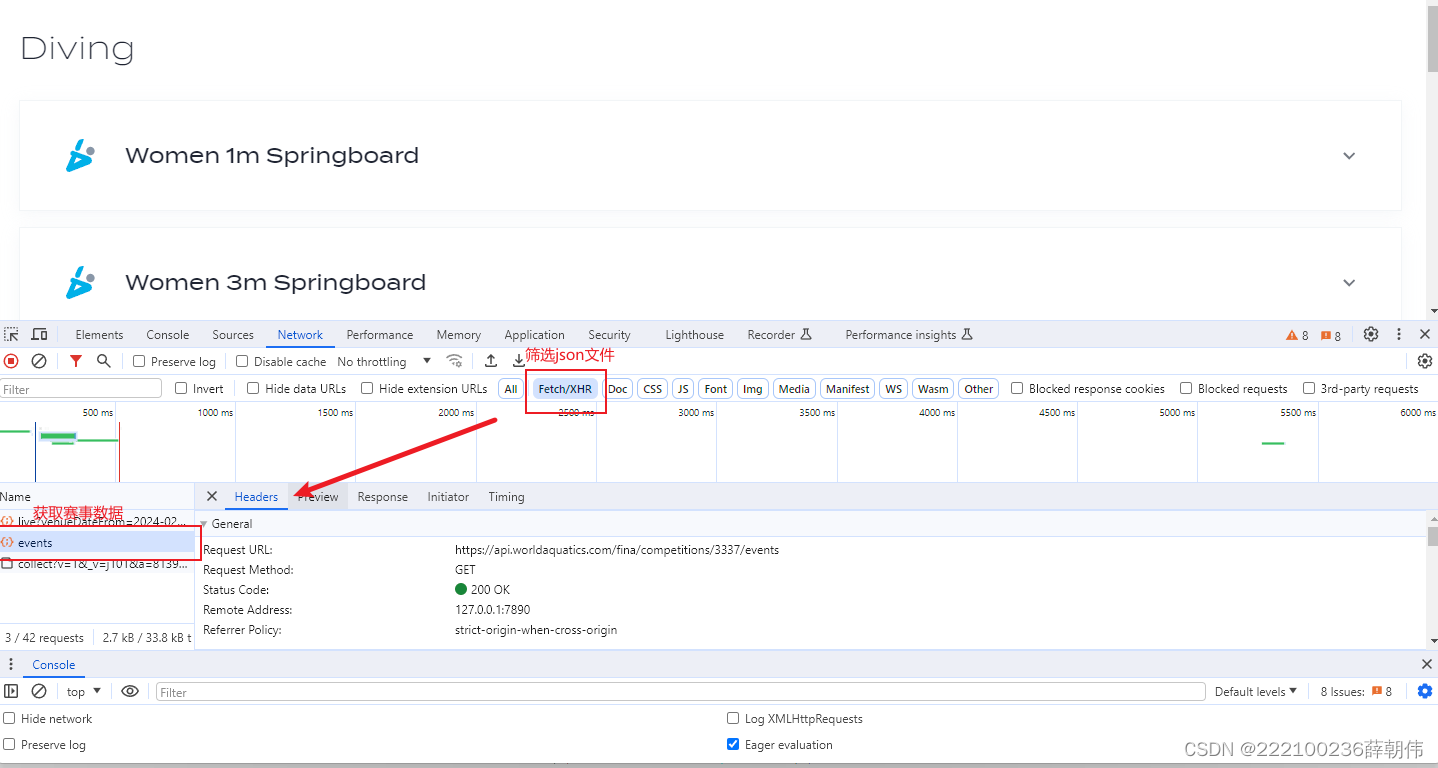
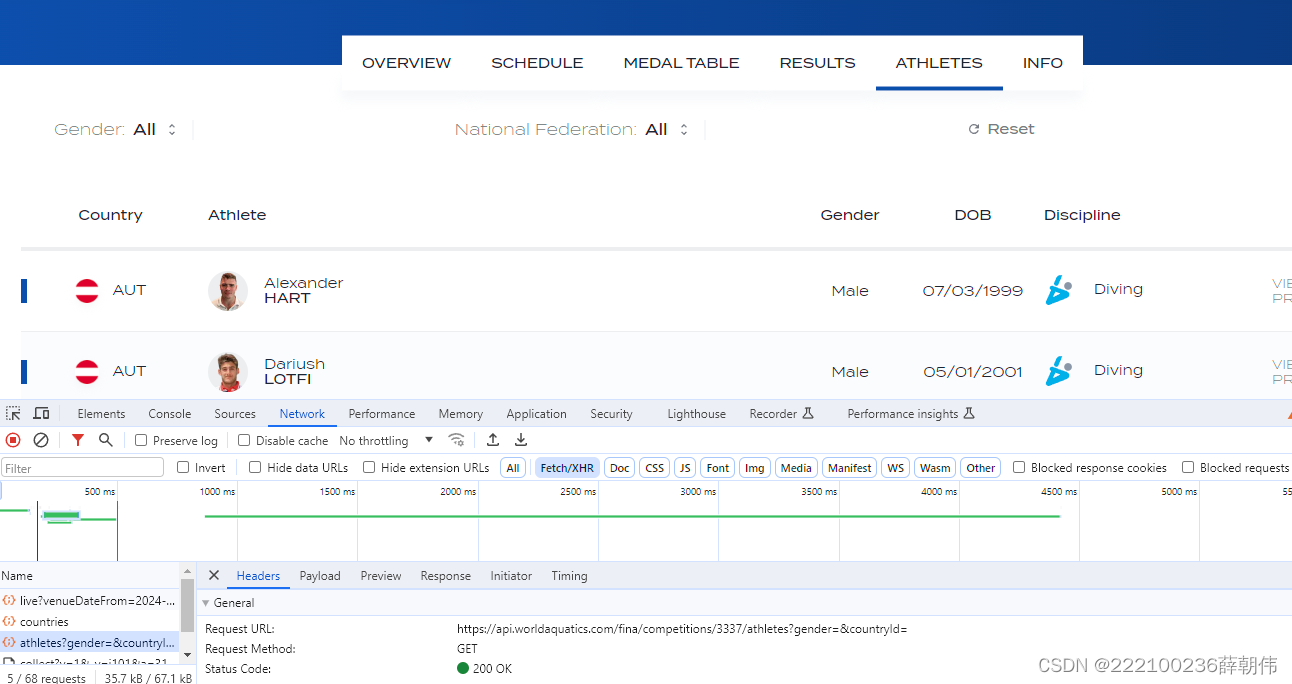
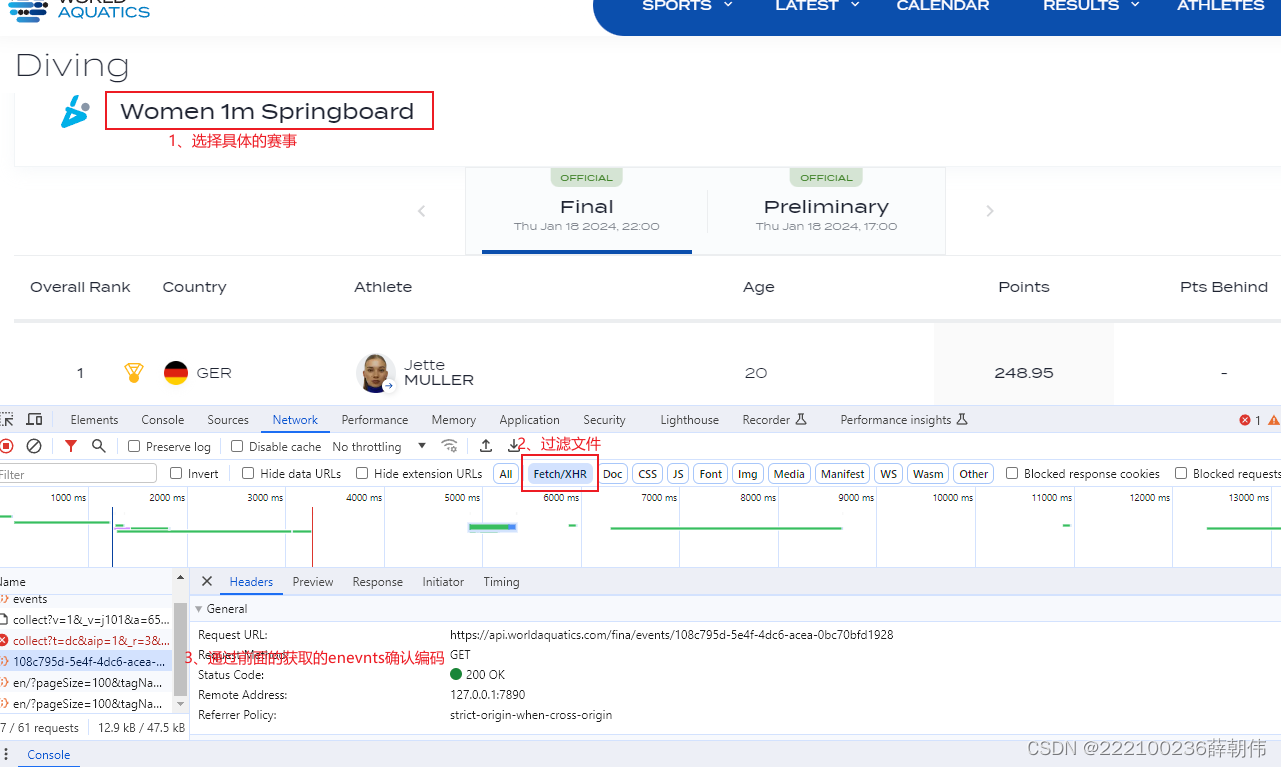
(1)读取JSON文件:
filePath,指向存储运动员信息的JSON文件。new String(..., StandardCharsets.UTF_8))。(2)解析JSON数据:
Gson对象实例,用于解析JSON字符串。gson.fromJson(content, Country[].class),将JSON字符串转换成Country对象数组。(3)提取运动员信息:
PreferredFirstName进行字典序排序。parseAthlete方法生成格式化字符串。(4)返回格式化字符串:
(1) 获取赛事ID:
getEventIdByDisciplineName(name)方法,通过赛事名称获取赛事ID。(2)读取赛事结果文件:
filePath。new String(..., StandardCharsets.UTF_8))。(3) 解析赛事结果JSON数据:
Gson对象实例,用于解析JSON字符串。gson.fromJson(content, CompetitionResult.class),将JSON字符串转换成CompetitionResult对象。(4) 提取决赛结果:
CompetitionResult对象的Heats数组,寻找名称为"Final"的项。Results,对每个结果使用parseFinalResult方法生成格式化字符串。(5)返回格式化的结果字符串:
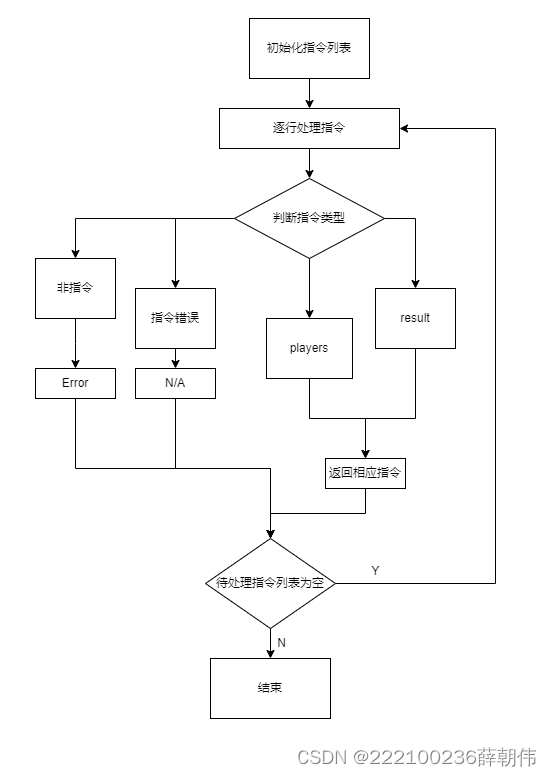
public static List<Instruction> getInstructionsFromFile(String filePath) throws IOException {
    List<Instruction> instructions = new ArrayList<>();
    List<String> validEvents = Arrays.asList(
            "women 1m springboard", "women 3m springboard", "women 10m platform",
            "women 3m synchronised", "women 10m synchronised",
            "men 1m springboard", "men 3m springboard", "men 10m platform",
            "men 3m synchronised", "men 10m synchronised"
    );

    String content = new String(Files.readAllBytes(Paths.get(filePath)), StandardCharsets.UTF_8);
    String[] lines = content.split("\n");
    for (String line : lines) {
        line = line.trim();
        if (line.startsWith("result ")) {
            String[] parts = line.substring("result ".length()).trim().split(" ", 4); // 最多分割成4部分

            if (parts.length >= 3 && validEvents.contains(String.join(" ", Arrays.copyOf(parts, parts.length - (parts.length == 4 ? 1 : 0))))) {
                String eventName = String.join(" ", Arrays.copyOf(parts, parts.length - (parts.length == 4 ? 1 : 0)));
                boolean isDetail = parts.length == 4 && "detail".equals(parts[3]);
                if (isDetail) {
                    instructions.add(new Instruction("result", eventName + " detail"));
                } else if (parts.length == 3) {
                    instructions.add(new Instruction("result", eventName));
                } else {
                    instructions.add(new Instruction("n/a", null)); // 不符合预期的指令格式
                }
            } else {
                instructions.add(new Instruction("n/a", null)); // 比赛项目名称无效
            }
        } else if ("players".equals(line)) {
            instructions.add(new Instruction("players", null)); // players指令
        } else {
            instructions.add(new Instruction("error", null)); // 无法识别的指令
        }
    }
    return instructions;
}
public class Event {
    private List<Sport> Sports;

    public static class Sport {
        private List<Discipline> DisciplineList;

    public static class Discipline {
        private String Id;
        private String DisciplineName;
}

public class CompetitionResult {
    List<Heat> Heats;

    public static class Heat {
        String Name;
        List<Result> Results;
    }

    public static class Result {
        private String FullName;
        private int Rank;
        private String TotalPoints;
        private List<Dive> Dives;

    }

    public static class Dive {
        private String DivePoints;
}

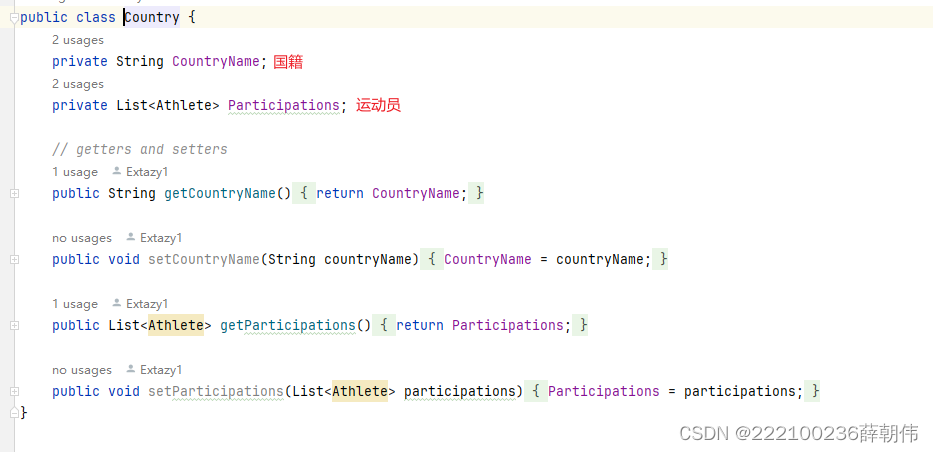
public class Country {
    private String CountryName;
    private List<Athlete> Participations;
}

class Athlete {
    private int Gender; // 0 for male, 1 for female
    private String PreferredLastName;
    private String PreferredFirstName;
}
private static Object getCachedJson(String filePath, Class<?> clazz) throws IOException {
    Object cachedResult = jsonParseCache.get(filePath);
    if (cachedResult == null) {
        String content = fileContentCache.computeIfAbsent(filePath, k -> {
            try {
                return new String(Files.readAllBytes(Paths.get(k)), StandardCharsets.UTF_8);
            } catch (IOException e) {
                e.printStackTrace();
                return null;
            }
        });
        cachedResult = gson.fromJson(content, clazz);
        jsonParseCache.put(filePath, cachedResult);
    }
    return cachedResult;
}
该代码主要用于处理锦标赛相关数据,包括从JSON文件中读取数据、解析运动员信息、赛事结果等。优化的关键点在于减少对同一JSON文件的重复解析。以下是优化策略:
单例模式缓存:由于Gson实例的创建相对昂贵,我们可以将其实例化一次并重用,同时缓存已解析的JSON数据,避免对相同文件的重复解析。
缓存JSON解析结果:对于从文件中读取的JSON数据,特别是在getEventIdByDisciplineName和getFinalResult/getAllResults方法中可能会多次读取同一个文件,可以将首次解析的结果存储在内存中,之后需要时直接从缓存获取。
优化Gson的使用:在整个类中,只需创建一次Gson实例并重复使用它,而不是每次调用方法时都创建新的实例。
    private static Object getCachedJson(String filePath, Class<?> clazz) throws IOException {
        Object cachedResult = jsonParseCache.get(filePath);
        if (cachedResult == null) {
            String content = fileContentCache.computeIfAbsent(filePath, k -> {
                try {
                    return new String(Files.readAllBytes(Paths.get(k)), StandardCharsets.UTF_8);
                } catch (IOException e) {
                    e.printStackTrace();
                    return null;
                }
            });
            cachedResult = gson.fromJson(content, clazz);
            jsonParseCache.put(filePath, cachedResult);
        }
        return cachedResult;
    }
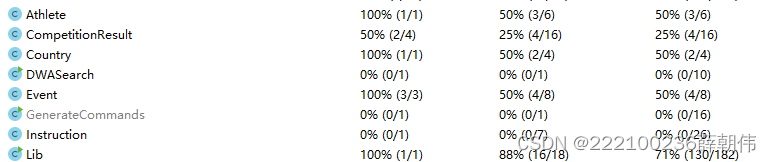
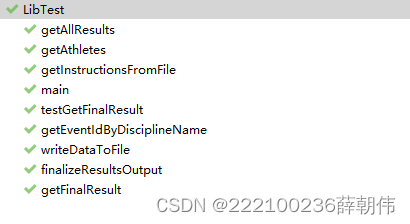
对核心的Lib类进行测试,部分测试函数和结果如下
@Test
public void testGetFinalResult() throws IOException {
    Lib lib = new Lib();
    lib.getFinalResult("Women 10m Platform");
    lib.getFinalResult("Men 100m Butterfly");
    lib.getFinalResult("");
    lib.getFinalResult(null);
    lib.getFinalResult("   ");
    lib.getFinalResult("Women 10m Platform Women 10m Platform Women 10m Platform");
    lib.getFinalResult("@#$%^&*");
    lib.getFinalResult("123456");
    lib.getFinalResult("Women10mPlatform2024");
    lib.getFinalResult("Women 10m Platform is a very long event name that might exceed the expected limit");
}
if (args.length != 2) {
    System.out.println("命令行应输入两个参数: <输入文件> <输出文件>");
    System.exit(-1);
}
    try {
        Lib.writeDataToFile(inputFile, outputFile);
    } catch (IOException e) {
        System.out.println("发生错误:" + e.getMessage());
        e.printStackTrace();
    }
通过这次作业,我深刻体会到了合理安排时间、细读作业要求、性能优化意识。我意识到,仅仅让程序运行并不够,性能优化同样重要,尤其是面对大量数据时。利用互联网,我解决了许多难题,这不仅促进了思路的开拓,也加深了对问题的理解。此外,我学会了JSON数据处理和文件操作。这些技能的学习和应用,不仅提升了我的编程能力,也让我对软件工程的实际应用有了更深入的了解。这次经历不仅是对技术能力的提升,更是对学习方法和解决问题策略的一次成长。


