WPF/Silverlight

wpf写的插件,不能显示图片资源,
 墨衍会员 · AI 创作全网分发 墨衍智能分发 通过墨衍一键同步至各平台 可同步平台 CSDN微信公众号微博知乎掘金百家号博客园抖音小红书 你的文章也可以这样分发 墨衍会员 ¥399起/年,写一次发全网
我也要 关注 + 加入社区
写了一个支持插件的软件A,就是在程序里调用另一个程序集B,发现:单独运行B 程序正常,能够显示各种资源包括图片图标能够正常显示,但当在A里面调用B显示出来的时候,图片资源就显示不出来了。
<Window x:Class="MainWindow"
        xmlns="http://schemas.microsoft.com/winfx/2006/xaml/presentation"
        xmlns:x="http://schemas.microsoft.com/winfx/2006/xaml"
        xmlns:d="http://schemas.microsoft.com/expression/blend/2008"
        xmlns:mc="http://schemas.openxmlformats.org/markup-compatibility/2006"
        xmlns:local="clr-namespace:Flybird.Test.程序集资源"
        mc:Ignorable="d"
        Title="显示程序集资源图片" Height="450" Width="800">
    <Window.Resources >
        <BitmapImage x:Key="mycad1" UriSource="/Resources/cad1.ico"/>
    </Window.Resources>
    <StackPanel >
        <TextBlock Text="下面是引用资源一个图标:"/>
        <Image Source="{StaticResource mycad1 }" Width="32" Height="32" Margin="5" HorizontalAlignment="Left"/>
        <TextBlock Text="下面是引用路径一个图标:"/>
        <Image Source="/Resources/cad1.ico" Width="48" Height="48" HorizontalAlignment="Left" Margin="5"/>
    </StackPanel>
</Window>
上面是被调用的程序集B的窗体代码,cad1.ico是一个图标,生成方式:resources
<Window x:Class="MainWindow"
        xmlns="http://schemas.microsoft.com/winfx/2006/xaml/presentation"
        xmlns:x="http://schemas.microsoft.com/winfx/2006/xaml"
        xmlns:d="http://schemas.microsoft.com/expression/blend/2008"
        xmlns:mc="http://schemas.openxmlformats.org/markup-compatibility/2006"
        xmlns:local="clr-namespace:测试引用程序集"
        mc:Ignorable="d"
        Title="MainWindow" Height="450" Width="800">
    <StackPanel >
        <Button Content="打开程序集窗体" Click="Button_Click" Width="150" Height="38" HorizontalAlignment="Left"  />
        <Button Content="直接打开exe" Click="Button_Click_1" Width="150" Height="38" HorizontalAlignment="Left" />
    </StackPanel>


</Window>
Class MainWindow
    Private Sub Button_Click(sender As Object, e As RoutedEventArgs)
        Dim frm As New Flybird.Test.程序集资源.MainWindow
        frm.Show()
    End Sub

    Private Sub Button_Click_1(sender As Object, e As RoutedEventArgs)
        Dim path As String = AppDomain.CurrentDomain.BaseDirectory
        Dim spath As String = "..\..\..\程序集资源\bin\Debug\程序集资源测试.exe"
        Dim f As String = IO.Path.Combine(path, spath)
        'f = IO.Path.GetFullPath(f)
        'If IO.File.Exists(f) Then
        '    Dim p As New Process()
        '    Process.Start(f)
        'End If
        f = IO.Path.GetFullPath(f)
        If IO.File.Exists(f) Then
            Dim p As New Process()
            Process.Start(f)
        End If
    End Sub
End Class
这是程序A的前台和后台代码
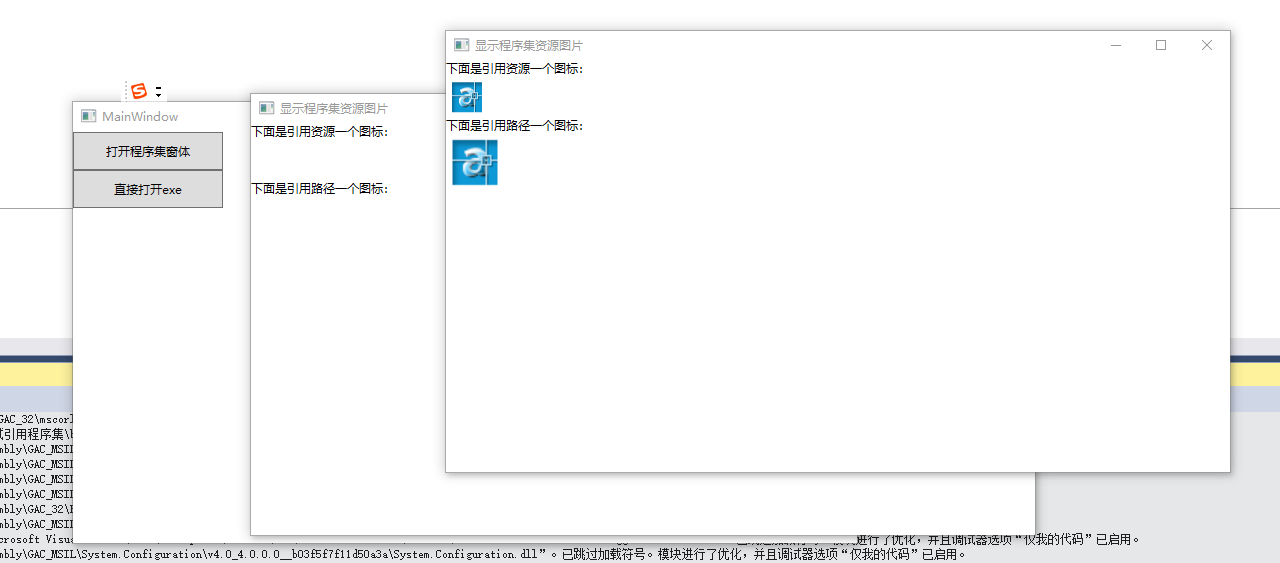
中间的那张图片就是通过程序集打开的,右边的就是直接运行的,通过程序集运行的显示不了图元。
...全文
相关推荐
WPF DataGrid 中显示图片的小例子
在WPF的 DataGrid控件中显示图片的小例子
98、多线程插件:实现WPF应用的插件管道
本文详细介绍了如何为WPF应用程序实现一个插件管道系统,以提升应用的扩展性和灵活性。从插件文件夹结构的设置,到各个管道组件(如契约、插件视图、插件、适配器等)的开发,再到主机应用程序对插件的发现与激活,每一步都进行了详细说明。同时,还涵盖了插件系统的优势、常见问题的解决方案以及性能优化建议。通过本文,开发者可以掌握构建高效、稳定插件系统的关键步骤和技术要点。
WPF中显示图片并将路径显示
WPF中利用image控件显示绝对路径下的图片,将绝对路径在textbox显示出来
wpf打开图片显示到界面
wpf打开图片显示到界面,另存为图片,并显示文件路径
【示例】在WPF简单实现图片圆角、只显示部分、渐变
在WPF中,无需编写C#代码,即可通过XAML实现图片的圆角、倒角、只显示部分内容、渐变等效果,在很多软件中大量使用。此示例模块化编写,代码简单易懂。