



40
社区成员
 发帖
发帖 与我相关
与我相关 我的任务
我的任务
 分享
分享
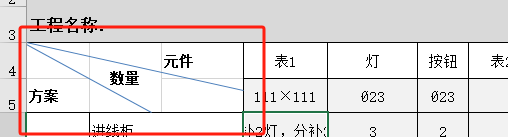
为了使用Element UI实现如图所示的带有两个分割线的表格样式,可以通过嵌套表格的方式来实现。下面是一个完整的代码示例,使用Vue和Element UI来创建这样的表格。
首先,确保你已经安装了Element UI和Vue。
npm install element-ui
npm install vue
然后,创建一个Vue项目,并在项目中使用以下代码:
<!DOCTYPE html>
<html lang="en">
<head>
  <meta charset="UTF-8">
  <title>Document</title>
  <link rel="stylesheet" href="https://unpkg.com/element-ui/lib/theme-chalk/index.css">
</head>
<body>
  <div id="app">
    <el-table :data="tableData" border>
      <el-table-column label="方案" width="150">
        <template slot-scope="scope">
          <div class="cell-with-lines">
            <div class="line-top-left"></div>
            <div class="line-bottom-right"></div>
            方案
          </div>
        </template>
      </el-table-column>
      <el-table-column label="数量" width="150">
        <template slot-scope="scope">
          <div class="cell-with-lines">
            <div class="line-top-left"></div>
            <div class="line-bottom-right"></div>
            数量
          </div>
        </template>
      </el-table-column>
      <el-table-column prop="unit" label="元件" width="150"></el-table-column>
      <el-table-column prop="spec" label="表1" width="150"></el-table-column>
      <el-table-column prop="light" label="灯" width="150"></el-table-column>
      <el-table-column prop="button" label="按钮" width="150"></el-table-column>
    </el-table>
  </div>

  <script src="https://cdn.jsdelivr.net/npm/vue@2.6.12/dist/vue.js"></script>
  <script src="https://unpkg.com/element-ui/lib/index.js"></script>
  <script>
    new Vue({
      el: '#app',
      data: function() {
        return {
          tableData: [
            { unit: '111×111', spec: 'Ø23', light: 'Ø23', button: 'Ø23' }
          ]
        }
      }
    })
  </script>
  <style>
    .cell-with-lines {
      position: relative;
      width: 100%;
      height: 100%;
      display: flex;
      align-items: center;
      justify-content: center;
    }

    .line-top-left {
      position: absolute;
      top: 0;
      left: 0;
      width: 50%;
      height: 1px;
      background: black;
      transform: rotate(-45deg);
      transform-origin: left top;
    }

    .line-bottom-right {
      position: absolute;
      bottom: 0;
      right: 0;
      width: 50%;
      height: 1px;
      background: black;
      transform: rotate(-45deg);
      transform-origin: right bottom;
    }
  </style>
</body>
</html>
这段代码将创建一个Vue应用,并使用Element UI的el-table组件创建一个表格。表格中的"方案"和"数量"单元格将包含两个斜线。通过CSS样式来实现这两个斜线的效果。

可以在这个单元格中展示一张图片


