


239
社区成员
 发帖
发帖 与我相关
与我相关 我的任务
我的任务
 分享
分享| 这个作业属于哪个课程 | 软件工程实践 |
|---|---|
| 这个作业要求在哪里 | 结对第二次作业——编程实现 |
| 结对学号 | 222200235,222200306 |
| 这个作业的目标 | 使用web技术实现原型的功能 |
| 其他参考文献 | JavaScript与vue的学习使用以及html与css教学 |
| PSP | Personal Software Process Stages | 预估耗时(分钟) | 实际耗时(分钟) |
|---|---|---|---|
| Planning | 计划 | 10 | 20 |
| • Estimate | • 估计这个任务需要多少时间 | 10 | 20 |
| Development | 开发 | 890 | 1190 |
| • Analysis | • 需求分析 (包括学习新技术) | 200 | 300 |
| • Design Spec | • 生成设计文档 | 20 | 40 |
| • Design Review | • 设计复审 | 10 | 10 |
| • Coding Standard | • 代码规范 (为目前的开发制定合适的规范) | 30 | 30 |
| • Design | • 具体设计 | 60 | 120 |
| • Coding | • 具体编码 | 500 | 600 |
| • Code Review | • 代码复审 | 30 | 30 |
| • Test | • 测试(自我测试,修改代码,提交修改) | 40 | 60 |
| Reporting | 报告 | 100 | 145 |
| • Test Report | • 测试报告 | 70 | 90 |
| • Size Measurement | • 计算工作量 | 10 | 15 |
| • Postmortem & Process Improvement Plan | • 事后总结, 并提出过程改进计划 | 20 | 40 |
| 合计 | 1000 | 1355 |
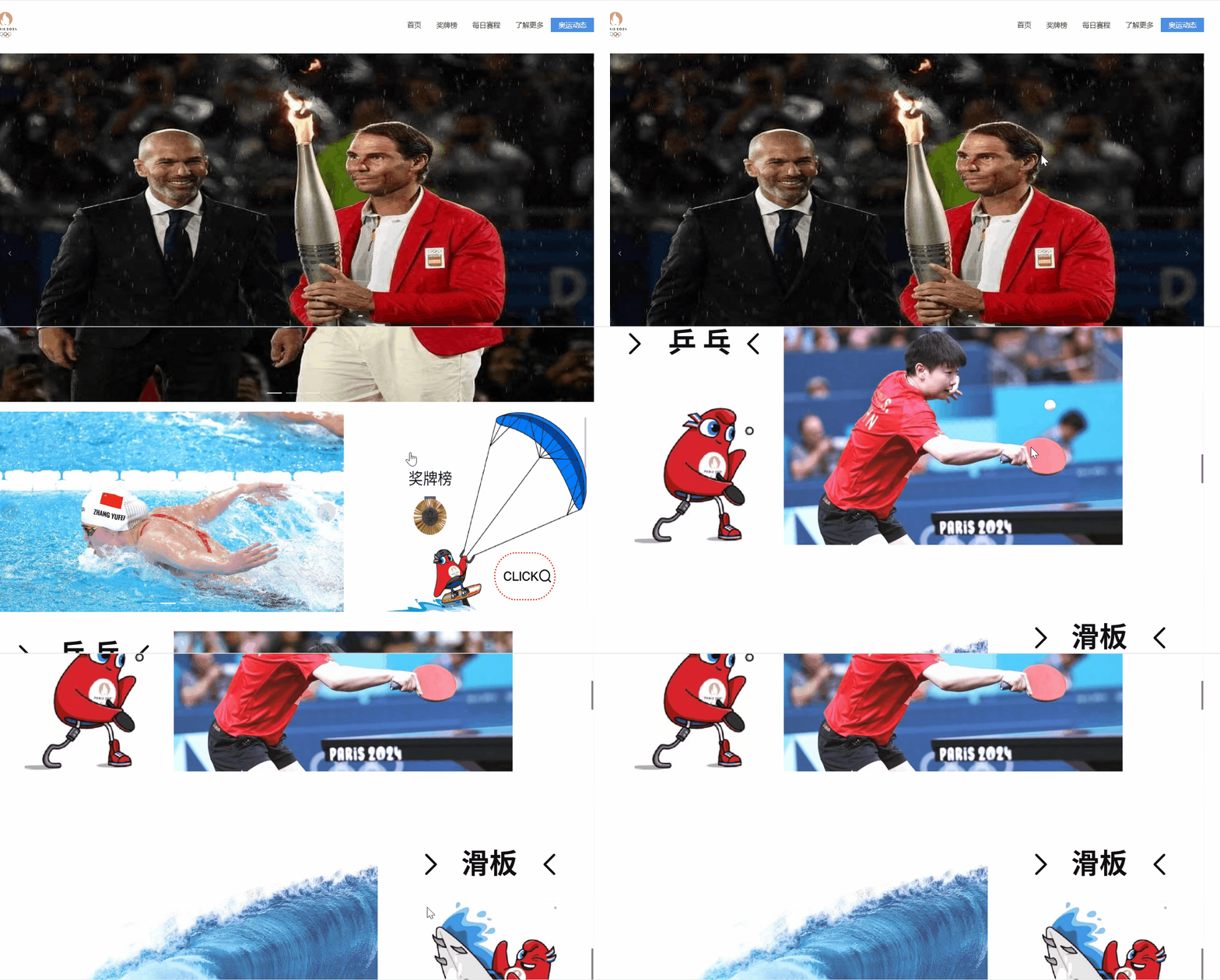
首页,奖牌榜,每日赛程,了解更多,奥运动态五个页面之间跳转
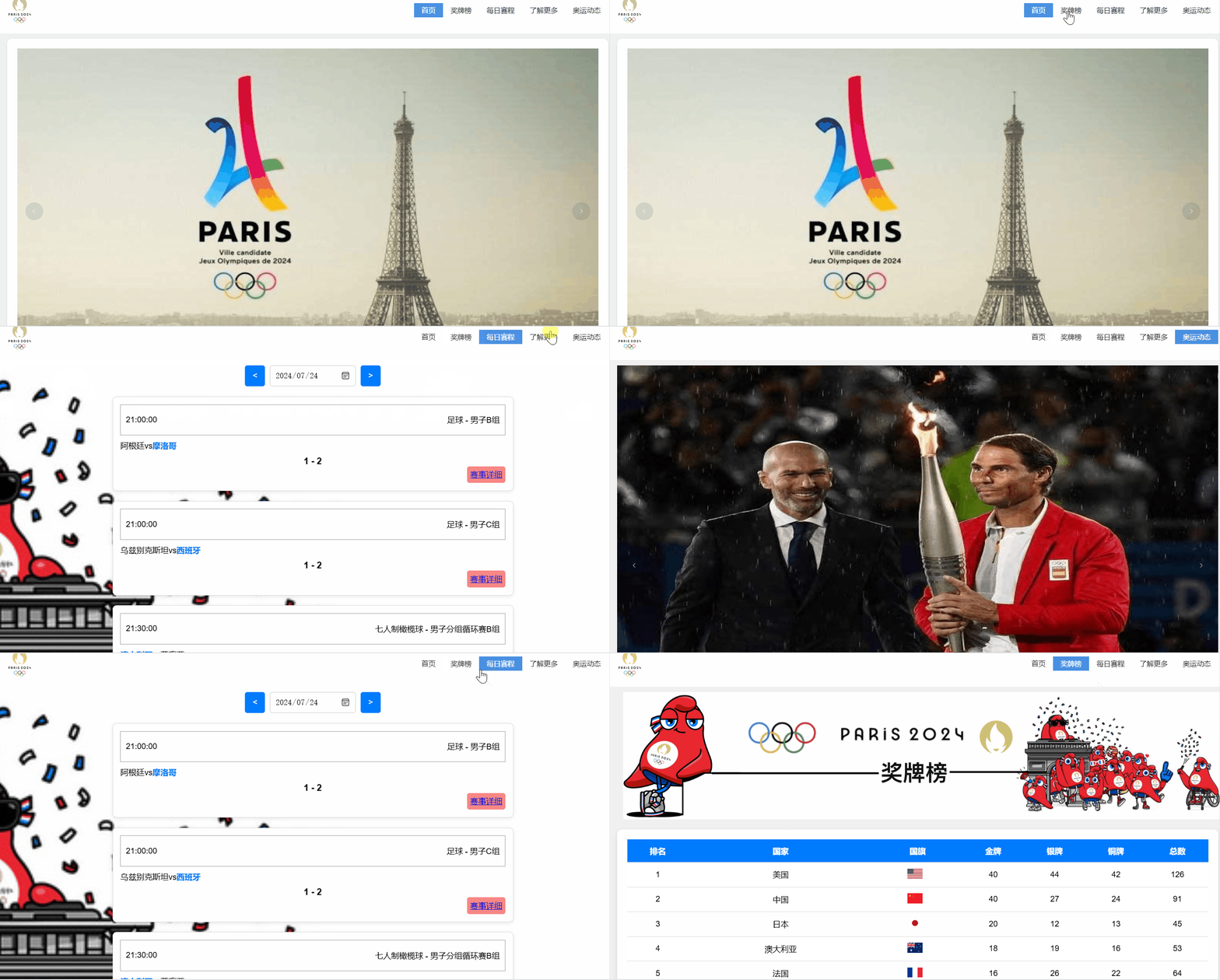
首页通过转播图和吉祥物图片使页面生动有趣
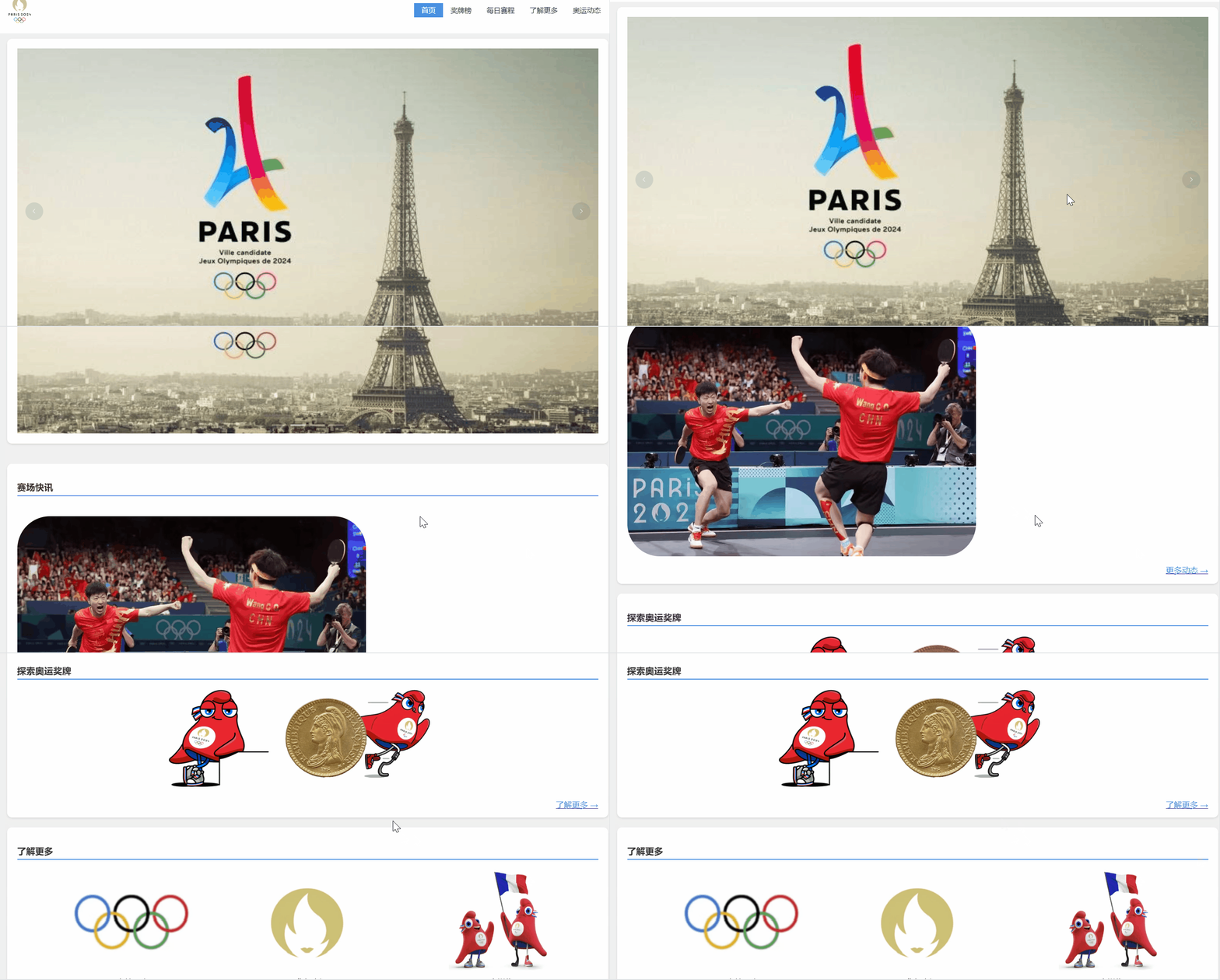
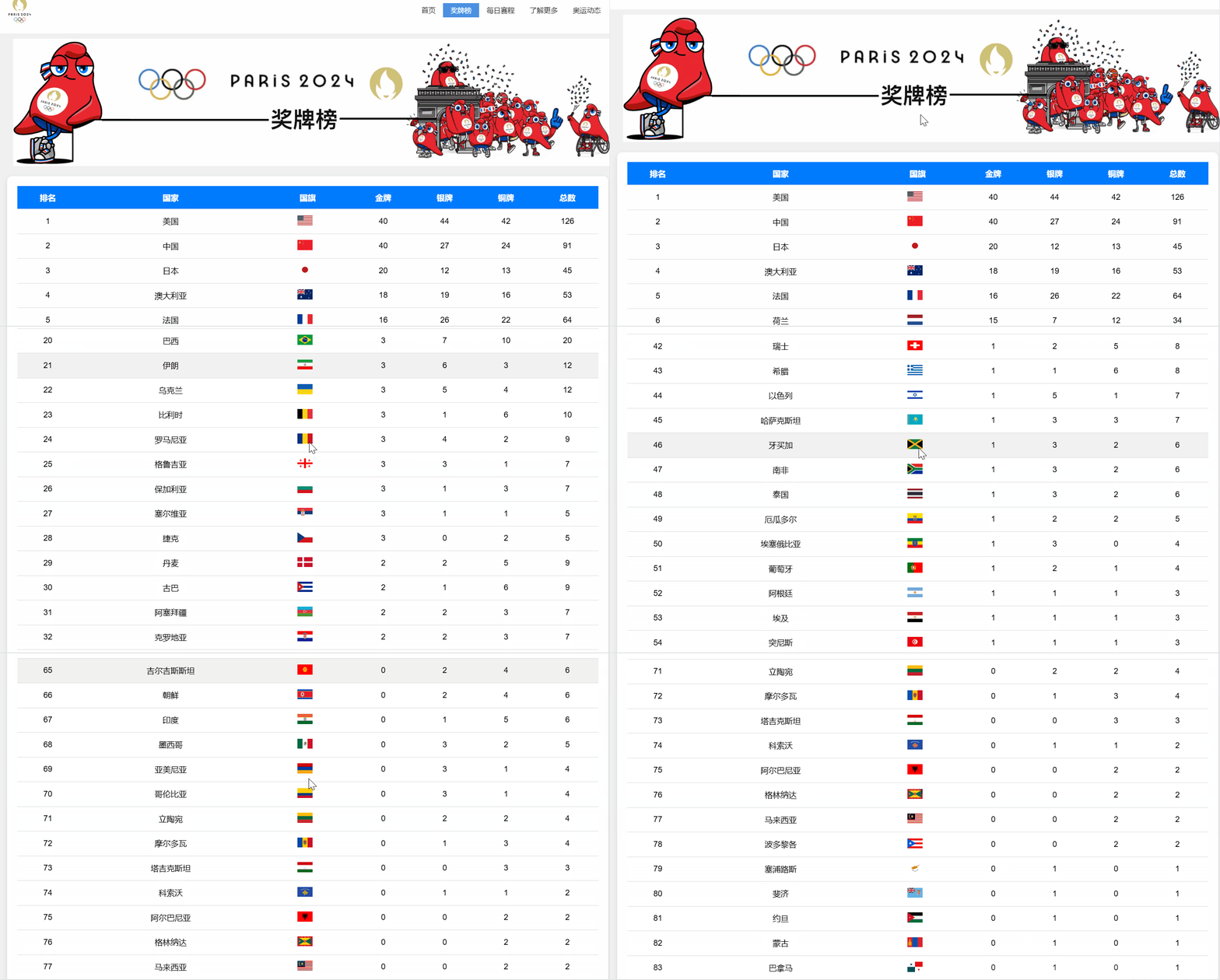
奖牌榜插入真实奖牌作为图章,用多组q版吉祥物做页面,使页面生动有趣
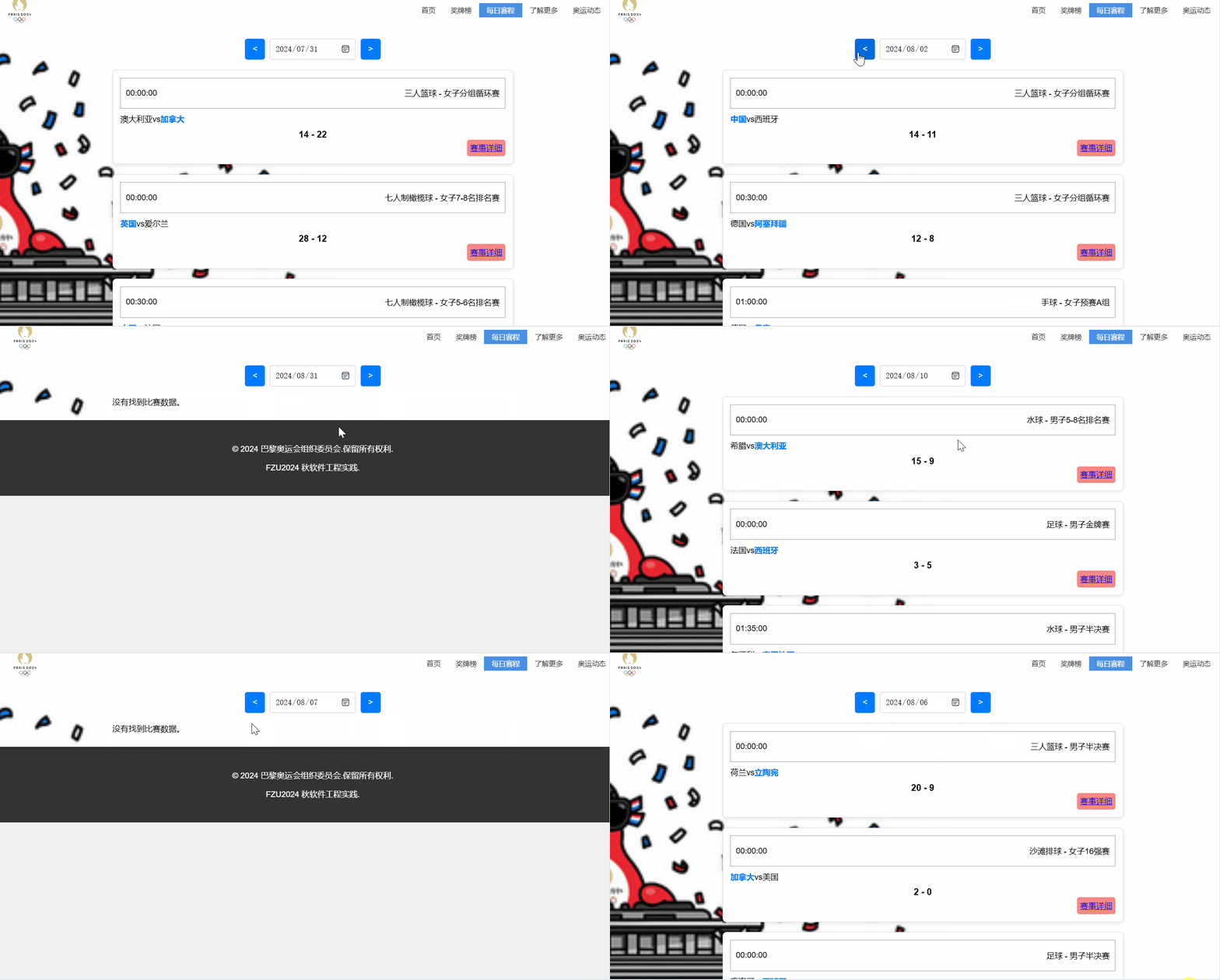
每日赛程页面浏览
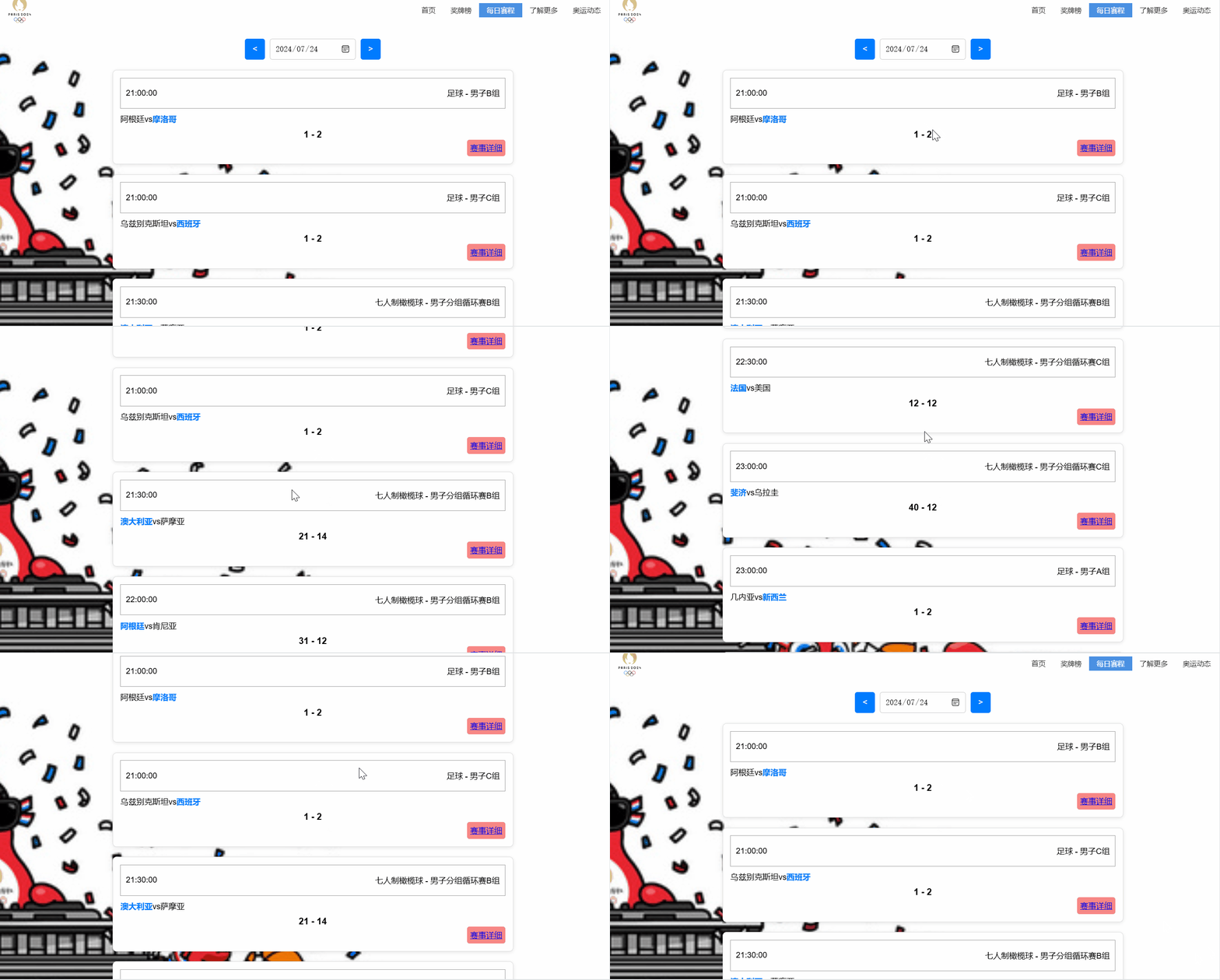
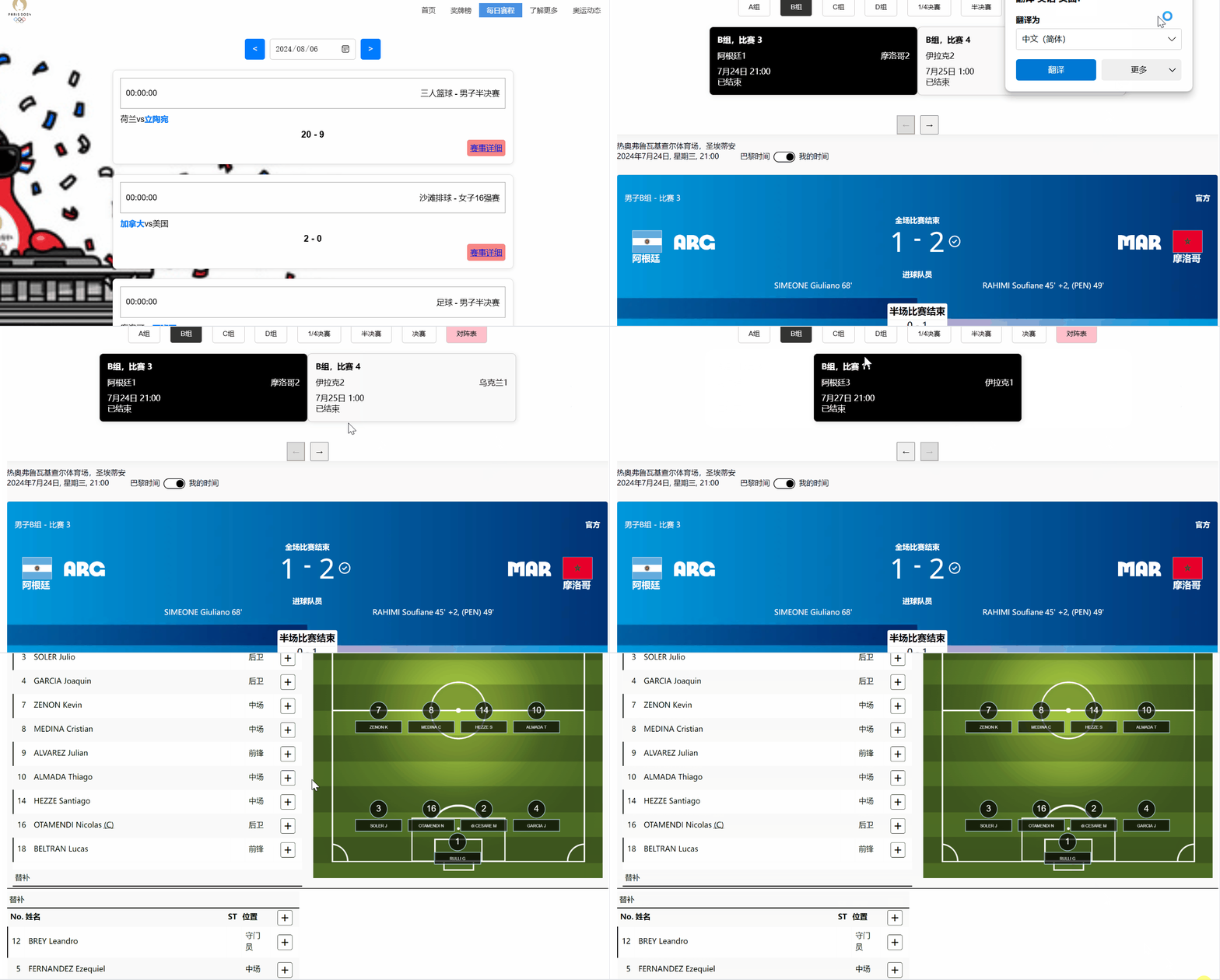
详细赛程页面浏览
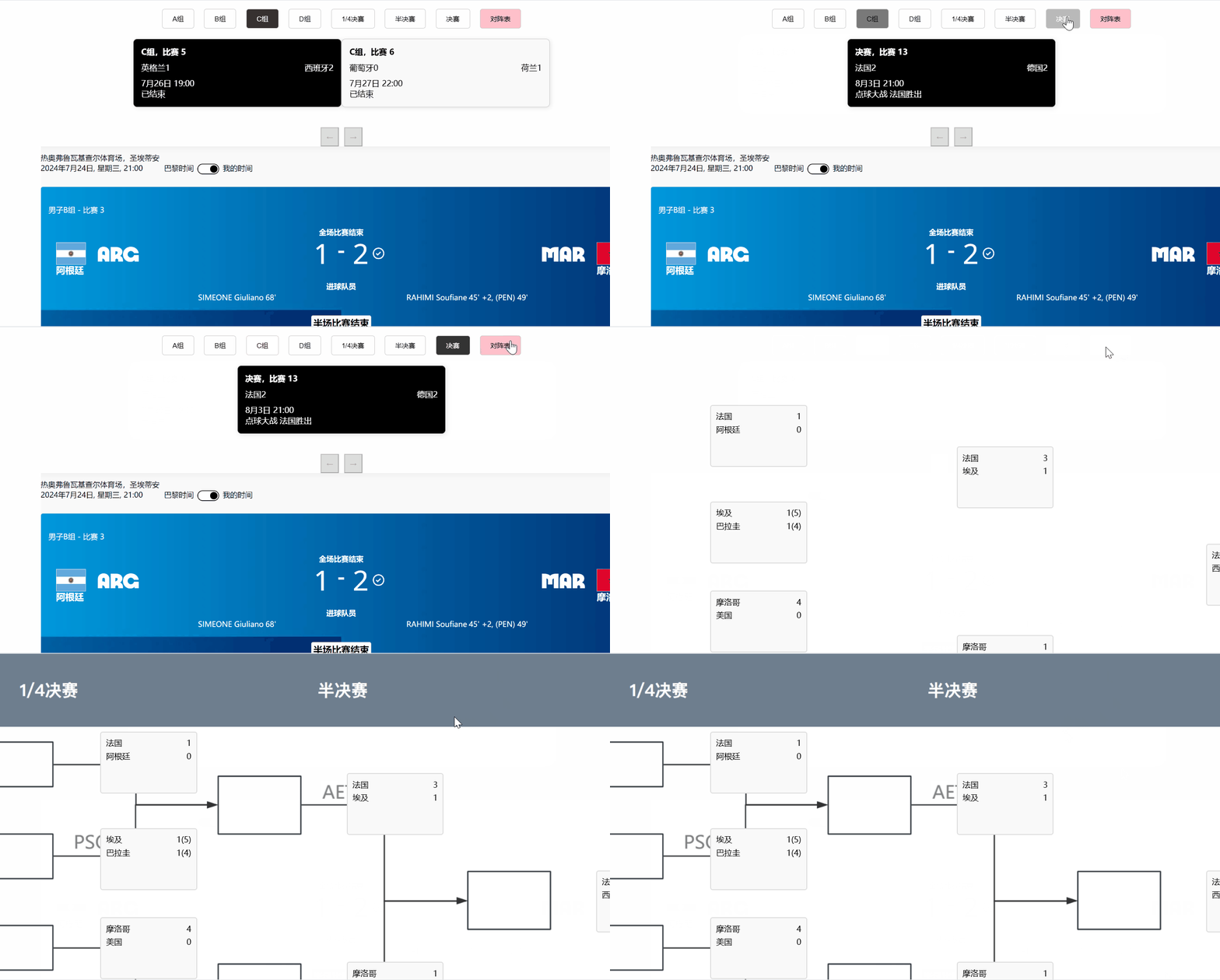
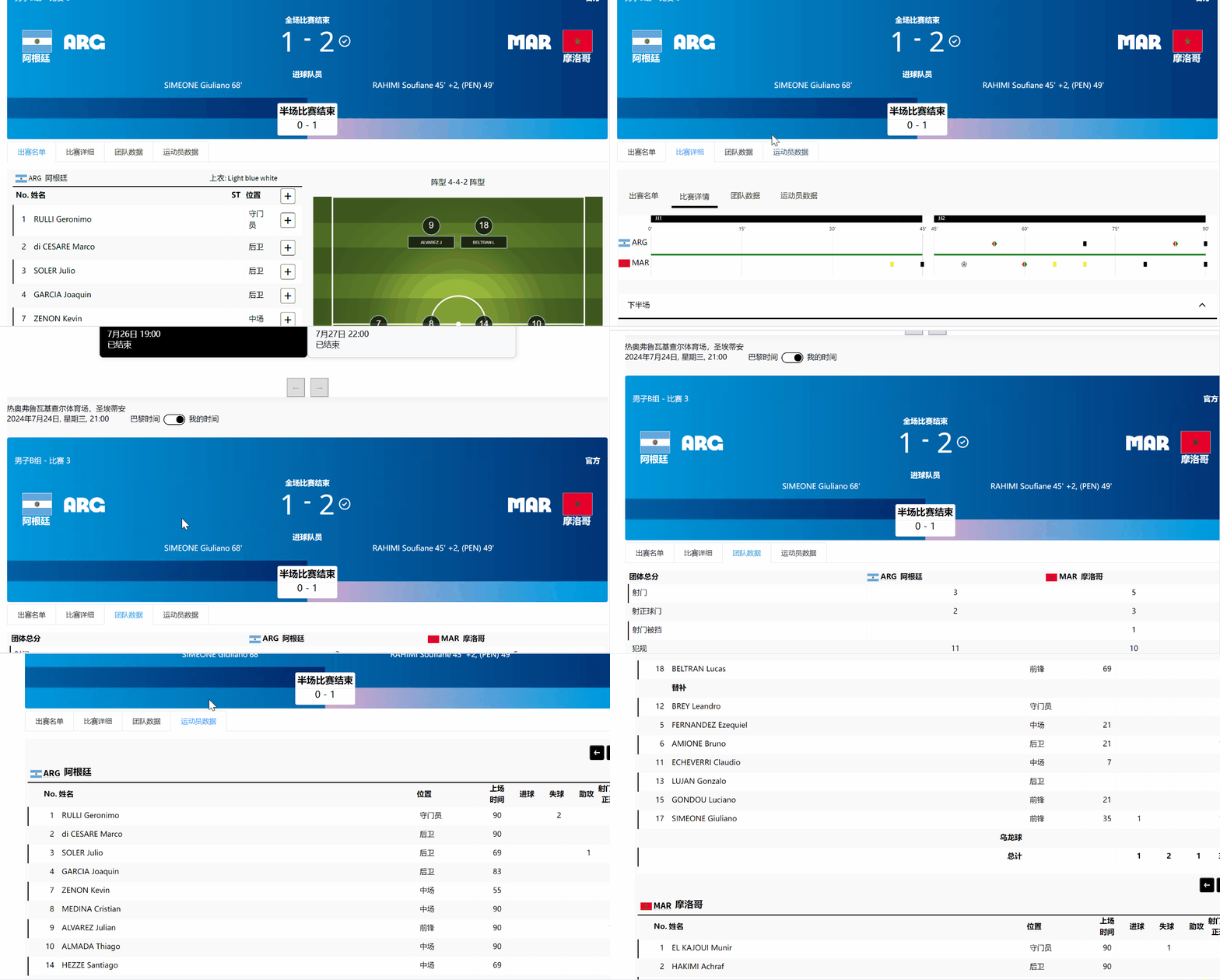
有显示高亮,有淘汰赛完整赛程展示
了解更多页面浏览,丰富巴黎奥运会
结合历史,展现奥运会与巴黎这座城市的魅力
特别设置了奥运动态展现中国奥运健儿的赛场风采
由于线下见面频率较少,因此多为线上讨论,如下图:


使用Vue框架开发整个项目,组件库使用ElementUI-plus进行组件的设计。
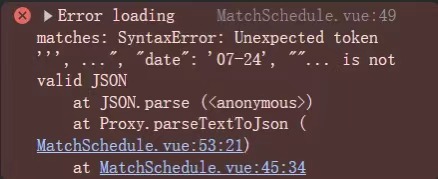
不同网页的数据杂乱不一,因此整理数据给我们带来了一定的困难,由于之前开发对于.json数据的了解,因此此次使用框架vue的构建中我们将数据都转化为.json数据,这样不仅统一了数据类型,也能够是数据界面不再杂乱,使得编程工作更好地进行下去。
下图是读取数据时发现数据类型不统一所遇到的问题:
在vue框架构建中,API交互是最容易造成困扰的部分,异步请求通常使用axios或fetch来解决,因此在学习axios前我们对此一无所知。复杂的数据结构和不同的管理请求状态大大增加了这份工作的复杂性。
将国家奖牌榜分为三个部分处理:
1)模板部分template:使用div容器包含全部内容,使用v-for指令动态渲染数据。
2)脚本部分script:导入奖牌榜的.json数据以及数据的forEach遍历。
3)样式部分style scoped:使用CSS进行样式布局和设计。
<template>
  <div class="container">
    <div class="header">
      <img src="/src/assets/medal/header.png" alt="header" />
    </div>

    <div class="medal-table">
      <table>
        <thead>
          <tr>
            <th>排名</th>
            <th>国家</th>
            <th>国旗</th>
            <th>金牌</th>
            <th>银牌</th>
            <th>铜牌</th>
            <th>总数</th>
          </tr>
        </thead>
        <tbody>
          <tr v-for="(country, index) in countriesMedals" :key="index">
            <td>{{ index + 1 }}</td>
            <td>{{ country.name }}</td>
            <td>
              <img :src="country.flag" alt="国旗" class="flag" />
            </td>
            <td>{{ country.gold }}</td>
            <td>{{ country.silver }}</td>
            <td>{{ country.bronze }}</td>
            <td>{{ country.total }}</td>
          </tr>
        </tbody>
      </table>
    </div>
  </div>
</template>

<script>
import '@/assets/base.css'
import medalData from '@/assets/medal.json'

export default {
  data() {
    return {
      countriesMedals: []
    }
  },
  created() {
    this.calculateMedals()
  },
  methods: {
    calculateMedals() {
      const medalsTable = medalData.medalsTable
      const countries = {}

      // 遍历每个项目的获奖数据
      medalsTable.forEach((item) => {
        const countryName = item.description
        const flag = item.flag // 从 item 中获取国旗 URL

        item.disciplines.forEach((discipline) => {
          discipline.medalWinners.forEach((winner) => {
            // 如果国家不在对象中,则初始化国家数据
            if (!countries[countryName]) {
              countries[countryName] = { gold: 0, silver: 0, bronze: 0, flag: flag }
            }

            // 根据奖牌类型累加
            if (winner.medalType === 'ME_GOLD') {
              countries[countryName].gold += 1
            } else if (winner.medalType === 'ME_SILVER') {
              countries[countryName].silver += 1
            } else if (winner.medalType === 'ME_BRONZE') {
              countries[countryName].bronze += 1
            }
          })
        })
      })

      // 将对象转换为数组并计算总奖牌数
      this.countriesMedals = Object.keys(countries).map((name) => {
        const { gold, silver, bronze, flag } = countries[name]
        return {
          name,
          gold,
          silver,
          bronze,
          total: gold + silver + bronze,
          flag // 包含国旗 URL
        }
      })

      // 根据金牌数进行排序
      this.countriesMedals.sort((a, b) => b.gold - a.gold || b.total - a.total)
    }
  }
}
</script>

<style scoped>
.container {
  max-width: 1200px;
  margin: 0 auto;
  padding: 10px;
}

.header {
  display: flex;
  img {
    width: 100%;
    height: 100%;
    margin-left: 10px;
  }
}

.medal-table {
  background-color: white;
  border-radius: 10px;
  box-shadow: 0 4px 10px rgba(0, 0, 0, 0.1);
  padding: 20px;
  margin-top: 20px;
}

table {
  width: 100%;
  border-collapse: collapse;
  text-align: center;
}

thead {
  background-color: #007bff;
  color: white;
}

th,
td {
  padding: 12px;
  border-bottom: 1px solid #ddd;
}

tbody tr:hover {
  background-color: #f1f1f1;
}

.flag {
  width: 30px;
  height: 20px;
  margin-right: 10px;
}

@media (max-width: 768px) {
  th,
  td {
    font-size: 14px;
  }

  .flag {
    width: 25px;
    height: 15px;
  }
}
</style>
详细赛程说明:
1)样式部分采用按钮组并对其使用Flexbox进行布局,添加间距、边框和悬停效果,增强用户体验。
2)比赛筛选以时间表为筛子,使用computed根据当前组和当前页筛选比赛,确保分页显示。
<template>
    <div class="container">
        <div class="match-page">
      <!-- 按钮组 -->
      <div class="button-group">
        <button
          v-for="(group, index) in groups"
          :key="index"
          :class="{'active': currentGroup === group.name}"
          @click="switchGroup(group.name)"
        >
          {{ group.name }}
        </button>

        <button class="mat-btn" style="background-color: pink;"><router-link to="/match/table" style="text-decoration: none;color:inherit ; ">对阵表</router-link></button>

      </div>

      <!-- 比赛框 -->
      <div class="match-list">
        <div
          v-for="(match, index) in filteredMatches"
          :key="index"
          class="match-card"
          :class="{ 'highlight': index === 0 }"
        >
          <div class="match-title">{{ match.group }},比赛 {{ match.matchNumber }}</div>
          <div class="teams">
            <div class="team">
              <span>{{ match.team1 }}</span>
              <span>{{ match.score1 }}</span>
            </div>
            <div class="team">
              <span>{{ match.team2 }}</span>
              <span>{{ match.score2 }}</span>
            </div>
          </div>
          <div class="match-time">{{ match.time }}</div>
          <div class="match-status">{{ match.status }}</div>
        </div>
      </div>

      <!-- 分页按钮 -->
      <div class="pagination">
        <button @click="prevPage" :disabled="currentPage === 1">←</button>
        <button @click="nextPage" :disabled="currentPage === totalPages">→</button>
      </div>
    </div>

    <img src="/src/assets/match/img1.png" alt="" style="height: 100%;width: 100%;">

    <el-tabs
    v-model="activeName"
    type="card"
    class="demo-tabs"
    @tab-click="handleClick"
  >
    <el-tab-pane label="出赛名单" name="first" >
        <div class="list">
            <img src="/src/assets/match/出赛名单.png" alt="" style="width: 100%; height: 665px;">
        <img src="/src/assets/match/出赛名单2.png" alt="" style="width: 583px;height: 423px;">
        <img src="/src/assets/match/出赛名单3.png" alt="" style="width: 100%; height: 665px;">
        <img src="/src/assets/match/出赛名单4.png" alt="" style="width: 583px;height: 423px;">
        <img src="/src/assets/match/出赛名单5.png" alt="" style="width: 100%; height: 522px;">
        </div>

    </el-tab-pane>
    <el-tab-pane label="比赛详细" name="second"><img src="/src/assets/match/比赛详细.png" alt="" style="width: 100%;"></el-tab-pane>
    <el-tab-pane label="团队数据" name="third"><img src="/src/assets/match/111.png" alt="" style="width: 100%;"></el-tab-pane>
    <el-tab-pane label="运动员数据" name="fourth"><img src="/src/assets/match/222.png" alt="" style="width: 100%;"></el-tab-pane>
  </el-tabs>


    </div>

  </template>

<script setup>
import { ref, computed } from 'vue'


// 设置默认选中的 Tab
const activeName = ref('first')

const handleClick = (tab) => {
  console.log('当前Tab:', tab)
}

// 比赛组数据
const groups = [
  { name: 'A组' },
  { name: 'B组' },
  { name: 'C组' },
  { name: 'D组' },
  { name: '1/4决赛' },
  { name: '半决赛' },
  { name: '决赛' }
]

// 比赛数据
const matches = ref([
  // A组比赛
  { group: 'A组', matchNumber: 1, team1: '法国', score1: 2, team2: '巴西', score2: 1, time: '7月22日 18:00', status: '已结束' },
  { group: 'A组', matchNumber: 2, team1: '德国', score1: 3, team2: '意大利', score2: 1, time: '7月23日 20:00', status: '已结束' },

  // B组比赛
  { group: 'B组', matchNumber: 3, team1: '阿根廷', score1: 1, team2: '摩洛哥', score2: 2, time: '7月24日 21:00', status: '已结束' },
  { group: 'B组', matchNumber: 4, team1: '伊拉克', score1: 2, team2: '乌克兰', score2: 1, time: '7月25日 1:00', status: '已结束' },
  { group: 'B组', matchNumber: 11, team1: '阿根廷', score1: 3, team2: '伊拉克', score2: 1, time: '7月27日 21:00', status: '已结束' },

  // C组比赛
  { group: 'C组', matchNumber: 5, team1: '英格兰', score1: 1, team2: '西班牙', score2: 2, time: '7月26日 19:00', status: '已结束' },
  { group: 'C组', matchNumber: 6, team1: '葡萄牙', score1: 0, team2: '荷兰', score2: 1, time: '7月27日 22:00', status: '已结束' },

  // D组比赛
  { group: 'D组', matchNumber: 7, team1: '墨西哥', score1: 2, team2: '韩国', score2: 2, time: '7月28日 20:00', status: '已结束' },
  { group: 'D组', matchNumber: 8, team1: '日本', score1: 3, team2: '沙特阿拉伯', score2: 1, time: '7月29日 18:00', status: '已结束' },

  // 1/4决赛
  { group: '1/4决赛', matchNumber: 9, team1: '法国', score1: 2, team2: '阿根廷', score2: 1, time: '7月30日 21:00', status: '已结束' },
  { group: '1/4决赛', matchNumber: 10, team1: '英格兰', score1: 1, team2: '日本', score2: 3, time: '7月31日 19:00', status: '已结束' },

  // 半决赛
  { group: '半决赛', matchNumber: 12, team1: '法国', score1: 3, team2: '日本', score2: 1, time: '8月1日 21:00', status: '已结束' },

  // 决赛
  { group: '决赛', matchNumber: 13, team1: '法国', score1: 2, team2: '德国', score2: 2, time: '8月3日 21:00', status: '点球大战 法国胜出' }
])

// 当前组和分页
const currentGroup = ref('B组')
const currentPage = ref(1)
const matchesPerPage = 2

// 计算当前组的比赛
const filteredMatches = computed(() => {
  const groupMatches = matches.value.filter(match => match.group === currentGroup.value)
  const startIndex = (currentPage.value - 1) * matchesPerPage
  return groupMatches.slice(startIndex, startIndex + matchesPerPage)
})

// 计算总页数
const totalPages = computed(() => {
  const groupMatches = matches.value.filter(match => match.group === currentGroup.value)
  return Math.ceil(groupMatches.length / matchesPerPage)
})

// 切换比赛组
const switchGroup = (group) => {
  currentGroup.value = group
  currentPage.value = 1
}

// 分页功能
const nextPage = () => {
  if (currentPage.value < totalPages.value) {
    currentPage.value++
  }
}

const prevPage = () => {
  if (currentPage.value > 1) {
    currentPage.value--
  }
}
</script>

<style scoped>

.container {
            max-width: 1200px;
            margin: 0 auto;
            padding: 10px;
            background-color: rgb(255, 255, 255);
            margin-top: 10px;
        }


.match-page {
  width: 100%;
  max-width: 1200px;
  margin: 0 auto;
}


.button-group {
  display: flex;
  justify-content: center;
  margin-bottom: 20px;
}

.button-group button {
  margin: 0 10px;
  padding: 10px 20px;
  border: 1px solid #ccc;
  background-color: white;
  cursor: pointer;
  border-radius: 5px;
  transition: background-color 0.3s ease;
}

.button-group button.active {
  background-color: #333;
  color: white;
}

.match-list {
  display: flex;
  justify-content: center;
  flex-wrap: wrap;
}

.match-card {
  background-color: #f9f9f9;
  border: 1px solid #ccc;
  padding: 15px;
  border-radius: 8px;
  margin-bottom: 20px;
  width: 32%;
  box-shadow: 2px 2px 10px rgba(0, 0, 0, 0.1);
}

.match-card.highlight {
  background-color: black;
  color: white;
}

.match-title {
  font-weight: bold;
  margin-bottom: 10px;
}

.teams {
  display: flex;
  justify-content: space-between;
  margin-bottom: 10px;
}

.team {
  display: flex;
  justify-content: space-between;
}

.pagination {
  display: flex;
  justify-content: center;
  margin-top: 20px;
}

.pagination button {
  padding: 10px;
  margin: 0 5px;
  cursor: pointer;
}

.pagination button:disabled {
  background-color: #ddd;
  cursor: not-allowed;
}
</style>
展示比赛日程并允许用户选择日期:
1)布局上使用一个背景图div class="bg-img",内部嵌套一个容器div class="container"。
2)使用日期选择器,包括前后按钮和日期输入框,用户可以通过点击按钮调整日期或直接选择日期。
<template>
<div class="bg-img" >
<div class="container">
<div class="schedule-container">
<div class="date-picker">
<button @click="changeDate(-1)"><</button>
<input type="date" v-model="selectedDate" @change="filterMatches" />
<button @click="changeDate(1)">></button>
</div>
<div class="matches" v-if="filteredMatches.length">
<div class="match-card" v-for="match in filteredMatches" :key="match.id">
<div class="match-header">
<span class="match-time">{{ match.time }}</span>
<span class="match-type">{{ match.sport }} - {{ match.name }}</span>
</div>
<div class="match-teams">
<div class="team">
<span :class="{ bold: match.winner === match.team1 }">{{ match.team1 }}</span>
<span>vs</span>
<span :class="{ bold: match.winner === match.team2 }">{{ match.team2 }}</span>
</div>
</div>
<div class="score">
{{ match.score1 }} - {{ match.score2 }}
</div>
<button class="details-button" ><router-link to="/match/detail">赛事详细</router-link></button>
</div>
</div>
<p v-else>没有找到比赛数据。</p>
</div>
</div>
</div>
</template>
<script>
import axios from 'axios';
export default {
data() {
return {
selectedDate: '2024-07-24',
matches: []
};
},
computed: {
filteredMatches() {
return this.matches.filter(match => match.date === this.selectedDate);
}
},
methods: {
fetchMatches() {
axios.get('/src/assets/match_schedule.json')
.then(response => {
this.matches = response.data;
console.log('Matches loaded:', this.matches);
})
.catch(error => console.error('Error loading matches:', error));
},
changeDate(days) {
const date = new Date(this.selectedDate);
date.setDate(date.getDate() + days);
this.selectedDate = date.toISOString().split('T')[0];
},
filterMatches() {
// 手动触发计算属性的更新
this.$forceUpdate();
}
},
mounted() {
this.fetchMatches();
}
};
</script>
<style scoped>
.bg-img{
width: 100vw;
height: 100%;
background-image: url('/src/assets/match/吉祥物2.jpg');
background-size: cover;
background-attachment: fixed;
}
.container {
max-width: 1200px;
margin: 0 auto;
padding: 10px;
}
.my-img {
display: flex;
justify-content: center;
}
.details-button {
background-color: #f88785;
color: white;
border: none;
padding: 6px 6px;
cursor: pointer;
font-size: 16px;
border-radius: 5px;
transition: background-color 0.3s ease;
float: right;
}
.schedule-container {
max-width: 800px;
margin: 0 auto;
}
.date-picker {
display: flex;
justify-content: center;
margin-bottom: 20px;
}
.date-picker button {
background-color: #007bff;
color: white;
border: none;
padding: 10px 15px;
cursor: pointer;
font-size: 16px;
margin: 0 10px;
border-radius: 5px;
transition: background-color 0.3s ease;
}
.date-picker button:hover {
background-color: #0056b3;
}
.date-picker input {
padding: 10px;
font-size: 16px;
border: 1px solid #ccc;
border-radius: 5px;
width: 150px;
}
.matches {
display: flex;
flex-direction: column;
gap: 20px;
}
.match-card {
background-color: white;
border: 1px solid #ddd;
padding: 15px;
border-radius: 8px;
box-shadow: 0 2px 8px rgba(0, 0, 0, 0.1);
}
.match-header {
display: flex;
justify-content: space-between;
align-items: center;
padding: 10px;
margin-bottom: 10px;
border: 1px solid #9f9f9f;
height: 40px;
}
.match-teams {
display: flex;
justify-content: space-between;
}
.bold {
font-weight: bold;
color: #007bff;
}
.score {
font-size: 18px;
font-weight: bold;
margin-top: 10px;
text-align: center;
}
</style>
在这次作业的过程中我认真学了了HTML、CSS和JavaScript的一些基础语句,并且成功搭建了一个巴黎奥运会的网页,成功实现数据输出和网页跳转等各种功能。
基础知识:首先要掌握HTML、CSS和JavaScript的基础知识。HTML用于构建网页的结构,CSS用于美化网页的样式,JavaScript用于实现网页的交互功能。
下面是我在学习过程中的心得
首先要掌握HTML、CSS和JavaScript的基础知识。HTML用于构建网页的结构,CSS用于美化网页的样式,JavaScript用于实现网页的交互功能。
选择一个适合自己的代码编辑器,比如Visual Studio Code、Sublime Text、Atom等,这些编辑器都有丰富的插件和功能,可以提高你的开发效率。
学习如何使用浏览器的开发者工具进行调试,这对于解决问题和优化代码非常有帮助。
学习Web前端可能会遇到一些困难和挫折,但只要保持耐心和坚持,不断学习和实践,就一定能够掌握这门技能。
夏合扎提:这次小组结对作业中,我的队友展现了出色的团队合作能力和技术素养。积极参与讨论,总是能提供有建设性的意见,并乐于接受他人的建议。对于 HTML 和 CSS 的积极学习令人印象深刻,能够迅速将设计思想转化为实际页面,带来了有效的解决方案。
叶弘毅:在此次合作中,我的队友表现得非常积极主动。他在页面交互和动态效果的实现上展现出了强大的能力,许多创新的想法都为我们的网页增色不少。他善于沟通,每次遇到问题都会与我及时讨论,确保我们在同一节奏上推进项目。我非常欣赏他的专业精神和合作态度。

附加功能详细赛况有做吗,好像没看到


