


113
社区成员
 发帖
发帖 与我相关
与我相关 我的任务
我的任务
 分享
分享| 这个作业属于哪个课程 | https://bbs.csdn.net/forums/2401_CS_SE_FZU |
|---|---|
| 这个作业要求在哪里 | https://bbs.csdn.net/topics/619470310 |
| 这个作业的目标 | 软件工程实践总结 |
| 其他参考文献 | 无 |
@
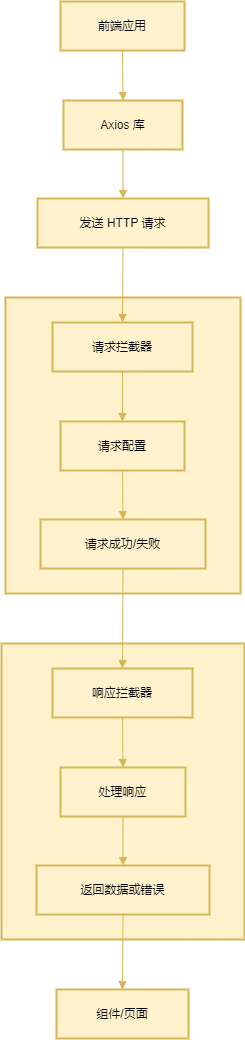
Axios 是一个基于 Promise 的 HTTP 客户端,能够在浏览器和 Node.js 环境中发送 HTTP 请求。它支持 GET、POST、PUT、DELETE 等常见的 HTTP 请求方式,并且具有拦截器、请求/响应转换、并发请求等特性,能够帮助前端开发者更加高效地处理 API 请求。由于其简洁的 API 和广泛的兼容性,Axios 成为前端开发中常用的 HTTP 请求库。学习 Axios 的原因主要是为了提高与后端服务交互的效率,并且能够在复杂应用中进行高效的错误处理和数据管理。Axios 的难点主要在于跨域请求处理、请求管理(如取消请求)、并发请求控制以及文件上传等场景的实现。
首先,需要通过 npm 或 yarn 安装 Axios。
npm install axios
或者
yarn add axios
GET 请求用于获取数据,可以通过 URL 和查询参数传递数据。
axios.get('/tasks', {
  params: { completed: true }
}).then(response => {
  console.log(response.data);
}).catch(error => {
  console.error(error);
});
POST 请求用于提交数据到服务器,数据通常作为请求体传递。
axios.post('/tasks', {
  title: 'New Task',
  completed: false
}).then(response => {
  console.log(response.data);
}).catch(error => {
  console.error(error);
});
PUT 请求通常用于更新已有资源。
axios.put('/tasks/1', {
  title: 'Updated Task',
  completed: true
}).then(response => {
  console.log(response.data);
}).catch(error => {
  console.error(error);
});
DELETE 请求用于删除指定资源。
axios.delete('/tasks/1').then(response => {
  console.log(response.data);
}).catch(error => {
  console.error(error);
});
文件上传通常使用 POST 请求,并且将文件作为 FormData 传递。
const formData = new FormData();
formData.append('file', file);

axios.post('/upload', formData, {
  headers: { 'Content-Type': 'multipart/form-data' }
}).then(response => {
  console.log(response.data);
}).catch(error => {
  console.error(error);
});
Axios 提供了 axios.all 来处理并发请求,适用于多个请求需要同时发起的场景。
axios.all([
  axios.get('/tasks'),
  axios.get('/users')
]).then(axios.spread((tasksResponse, usersResponse) => {
  console.log(tasksResponse.data, usersResponse.data);
})).catch(error => {
  console.error(error);
});
interface ApiResponse<T> {
  code: number;
  message: string;
  data: T;
}
interface Task {
  id: number;
  title: string;
  completed: boolean;
}
将所有与任务相关的 API 请求封装在一个模块中,方便统一管理。
import axiosInstance from './request';

export const getTasks = (): Promise<ApiResponse<Task[]>> => {
  return axiosInstance.get('/tasks');
};

export const createTask = (task: Task): Promise<ApiResponse<Task>> => {
  return axiosInstance.post('/tasks', task);
};
描述
在一些请求中,尤其是使用 POST 请求时,前端传递的请求参数(例如 JSON 数据或表单数据)可能会丢失。通常是因为请求头未设置正确,或者请求体的数据格式与服务器期望的格式不一致。
解决方案
确保在发送请求时,正确设置请求头和请求体的格式。例如,在发送 JSON 数据时,可以设置 Content-Type 为 application/json:
axios.post('/api/endpoint', { key: 'value' }, {
  headers: {
    'Content-Type': 'application/json'
  }
}).then(response => {
  console.log(response.data);
}).catch(error => {
  console.error(error);
});
同时,在后端应确保能够正确解析请求体中的数据。例如,在 Node.js 中使用 Express 时,确保启用了 express.json() 中间件来处理 JSON 数据:
app.use(express.json());
描述
有时候服务器响应的数据格式和前端预期的不一致,导致解析失败。例如,服务器返回的是 XML 格式数据,而前端使用了 .json() 来解析响应。
解决方案
首先,确保后端返回的数据格式与前端期望的格式一致。如果响应是 JSON 格式,应确保返回正确的 Content-Type 头信息:
res.setHeader('Content-Type', 'application/json');
res.send(JSON.stringify(responseData));
在前端使用 Axios 时,可以根据返回的数据格式来选择合适的解析方法。如果返回的是非 JSON 数据,需要使用 response.text() 或其他方式来处理:
axios.get('/api/endpoint')
  .then(response => {
    // 假设返回的是 XML
    const parser = new DOMParser();
    const xmlDoc = parser.parseFromString(response.data, "text/xml");
    console.log(xmlDoc);
  })
  .catch(error => {
    console.error(error);
  });
axios.get('/api/endpoint')
  .then(response => {
    const data = response.data || {}; // 设置默认值为空对象
    console.log(data);
  })
  .catch(error => {
    console.error(error);
  });
如果问题出在服务器端,确保服务器正确地返回了数据,且返回的内容是客户端所期望的格式。
描述
在上传大文件时,可能会遇到请求超时或文件上传失败的问题。这通常是因为服务器的文件大小限制或者前端请求超时设置不当。
解决方案
解决该问题的方法之一是调整服务器和客户端的文件大小限制。在服务器端,例如在 Node.js 中,使用 multer 中间件时,可以设置文件大小限制:
const multer = require('multer');
const upload = multer({ limits: { fileSize: 50 * 1024 * 1024 } }); // 限制文件大小为 50MB
在前端,通过设置 timeout 选项增加请求的超时时间,防止上传过程中超时:
axios.post('/upload', formData, {
  headers: { 'Content-Type': 'multipart/form-data' },
  timeout: 10000 // 设置超时时间为 10 秒
}).then(response => {
  console.log('上传成功');
}).catch(error => {
  console.error('上传失败:', error);
});
描述
在某些情况下,服务器返回的数据可能并不是预期的格式。例如,期望接收到一个 JSON 对象,但服务器返回了一个空字符串或 HTML 页面。
解决方案
为了确保数据格式正确,可以使用 responseType 配置选项,强制 Axios 解析返回的数据格式。如果返回的确实是 JSON 数据,可以指定 responseType: 'json':
axios.get('/api/endpoint', { responseType: 'json' })
  .then(response => {
    console.log(response.data);
  })
  .catch(error => {
    console.error('请求错误:', error);
  });
如果服务器返回的是 HTML 或其他非 JSON 格式的数据,可以根据实际情况处理响应,例如将返回的 HTML 解析为文本:
axios.get('/api/endpoint', { responseType: 'text' })
  .then(response => {
    console.log(response.data);  // 返回的是纯文本或HTML
  })
  .catch(error => {
    console.error('请求错误:', error);
  });
Axios 是一个非常强大的 HTTP 客户端,它简化了 HTTP 请求的管理和处理。通过 Axios,我们可以轻松地发起请求、处理响应、拦截请求、配置全局设置等。在使用过程中,跨域、请求管理、文件上传等问题常常是开发者会遇到的挑战,但这些问题有明确的解决方案。总的来说,Axios 的灵活性和强大功能使其在前端开发中广泛应用,并成为与后端 API 交互的首选工具。

