

 2401_MU_SE_FZU

Beta Sprint Summary Essay
 墨衍会员 · AI 创作全网分发 墨衍智能分发 通过墨衍一键同步至各平台 可同步平台 CSDN微信公众号微博知乎掘金百家号博客园抖音小红书 你的文章也可以这样分发 墨衍会员 ¥399起/年,写一次发全网
我也要 关注 + 加入社区
墨衍会员 · AI 创作全网分发 墨衍智能分发 通过墨衍一键同步至各平台 可同步平台 CSDN微信公众号微博知乎掘金百家号博客园抖音小红书 你的文章也可以这样分发 墨衍会员 ¥399起/年,写一次发全网
我也要 关注 + 加入社区| Which course does this assignment belong to | 2401_Mu_SE_FZU |
|---|---|
| Where is the requirement for this assignment | Teamwork—Beta Sprint |
| Team name | “ExamMastery Pioneers” |
| The goal of this assignment | Beta Sprint Summary Essay |
目录
- 1.Project expectations and completion status
- 1.1. Functional Features
- 1.2. Bug Fixes And Performance Improvements:
- 1.3. Cloud Server Stability & Frontend Enhancements:
- 1.4. Database Optimization & System Security Review:
- 1.5. Web Response Speed Optimization:
- 2.Improve plan completion
- 3.Project deployment link
- 4.Project function display
- Function1:Login function
- Function2:Personal Settings modification
- Function3:Calendar volume retrieval, preview and download
- Function4:Real-time interactive Q&A
- Function5:Notification
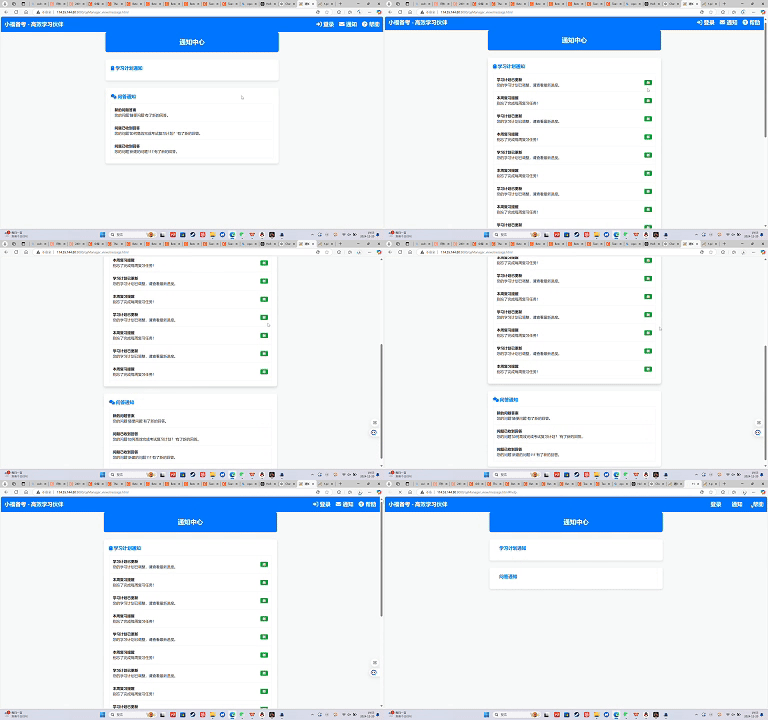
- Function6: Learning plan generation
- Function7: Full Video
- 5.Member Harvest
- 6.Distribute the contribution
1.Project expectations and completion status
| Expectations | Completed |
|---|---|
| Functional Features | Completed |
| Bug Fixes and Performance Optimization | Completed |
| Cloud Server Stability and Frontend Enhancements | Completed |
| Database Optimization and System Security Review | Completed |
| Optimize web response speed | Completed |
1.1. Functional Features
After reorganizing and simplifying the front-end navigation, we still received feedback from users who were not fully satisfied with the interface. As a result, we continued to optimize it based on their input. While we had improved navigation, there was still room for better viewing and switching between study plans. To address this, we added a feature in the notifications that allows users to click and view their study plan, ensuring they can easily and accurately find this option when they want to check their progress. These optimizations have addressed the feedback, improved the learning experience, and strengthened the system's appeal and competitiveness.
1.2. Bug Fixes And Performance Improvements:
The team resolved minor bugs in the user login functionality, ensuring a seamless authentication process for all users. Additionally, backend response times were improved, particularly addressing delays in message delivery, which enhanced overall system reliability.Database query performance was enhanced by optimizing SQL code and adjusting database indexes, leading to faster query execution times. .
1.3. Cloud Server Stability & Frontend Enhancements:
The team resolved the cloud server inaccessibility issue through manual patching and testing alternative restart methods, and implemented a backup server strategy to prevent future disruptions.Frontend improvements included fine-tuning UI components for better alignment and responsiveness, as well as testing the learning plan management feature on multiple devices to ensure consistency and usability across platforms.
1.4. Database Optimization & System Security Review:
Our team made comprehensive adjustments to the user information database, introducing stricter measures for student identity verification. Student numbers were established as unique identifiers to prevent duplicate registration and reduce the risk of malicious registration, significantly improving system security.This adjustment strengthened the accuracy and security of the system, protected students' personal data, and built user trust, ensuring the fairness and reliability of the registration process.
1.5. Web Response Speed Optimization:
To optimize web responsiveness, the team manually downloaded resources, placed them in the appropriate directory of the project, and adjusted resource paths in the code. This significantly improved web response speed and overall user experience.
2.Improve plan completion
System Performance Optimization: The database query mode is optimized, and the database cache is used to store the hotspot data, reducing the repeated query to the database.
Feature Expansion: To achieve personalized Settings, provide users with real-time discussion page function
Automated Testing: Unit and integration tests are performed on the back-end apis and logic to ensure that each module works as expected. Use tools for dependency injection, simulate external services, and test system performance under different conditions.
System Security Optimization: Use encryption to store and transmit sensitive data (such as user passwords, user student numbers, etc.). Use standard encryption algorithms to encrypt sensitive information in the database to ensure the security of information
3.Project deployment link
http://114.55.144.80:8080/qaManager_view/message.html#help
4.Project function display
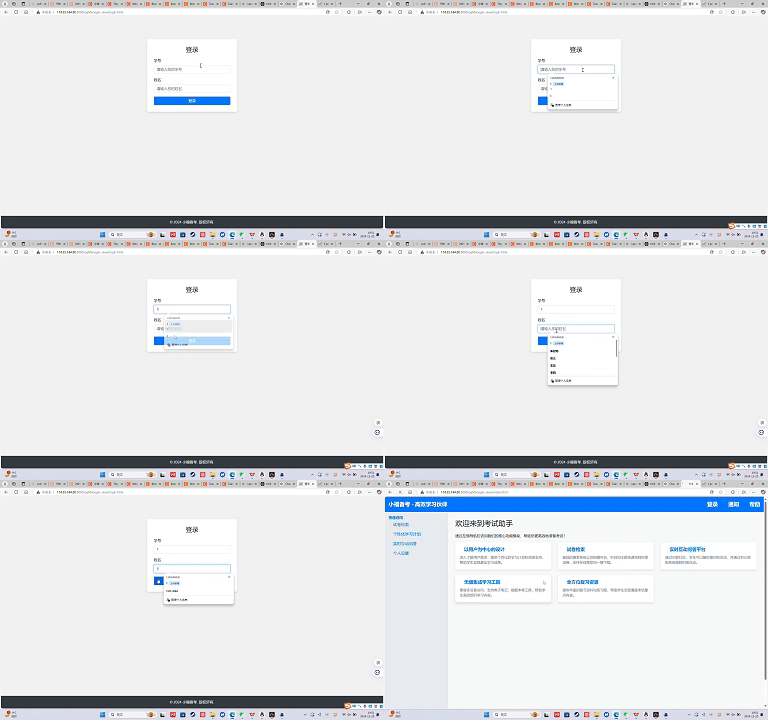
Function1:Login function
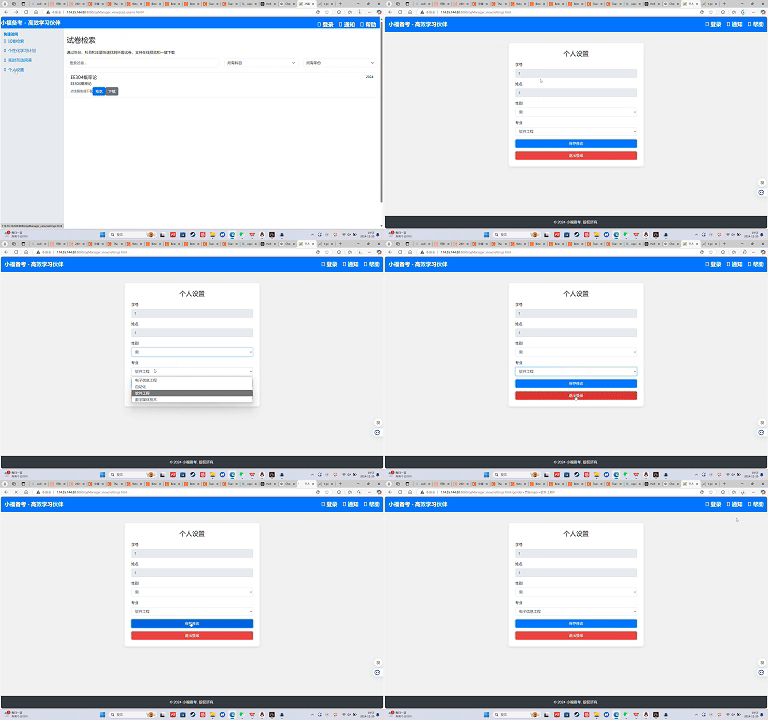
Function2:Personal Settings modification
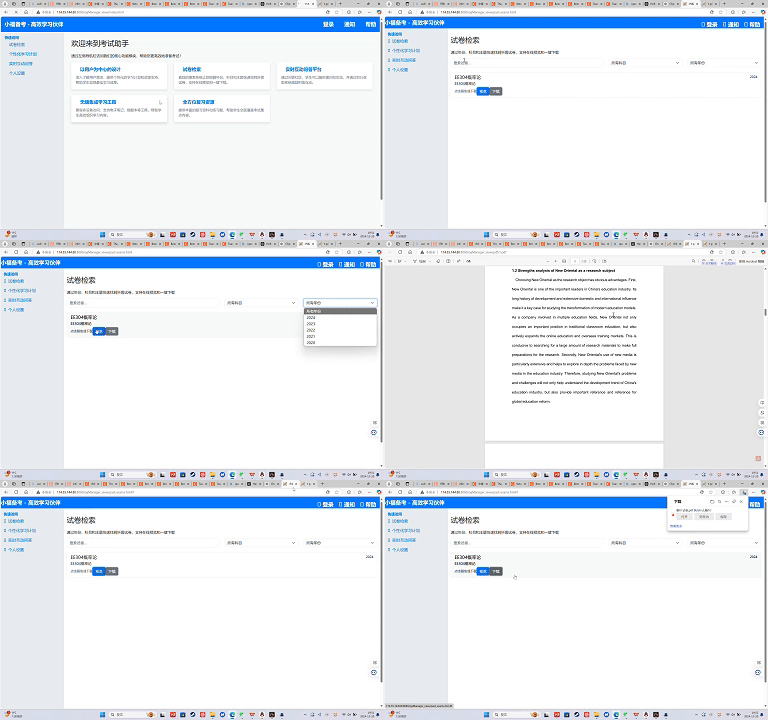
Function3:Calendar volume retrieval, preview and download
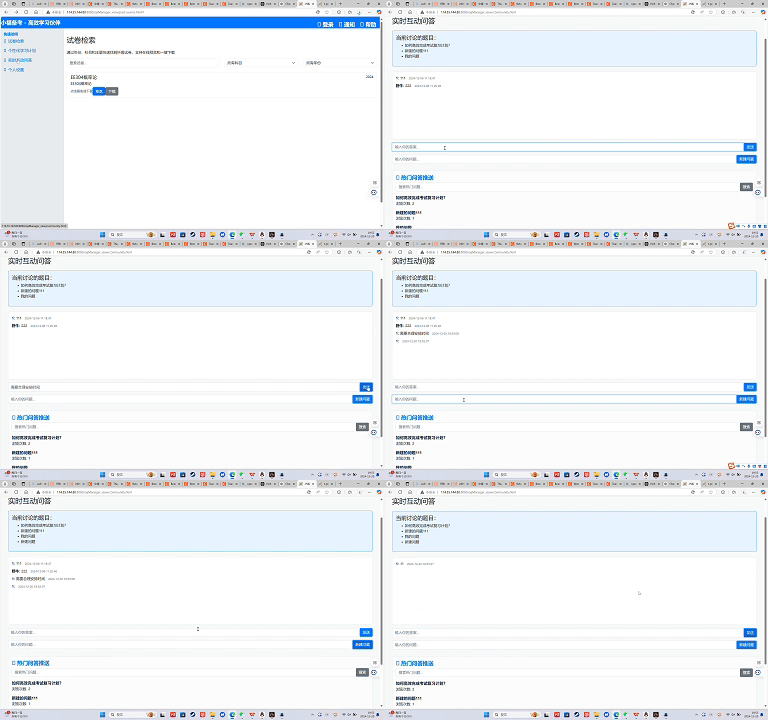
Function4:Real-time interactive Q&A
Function5:Notification
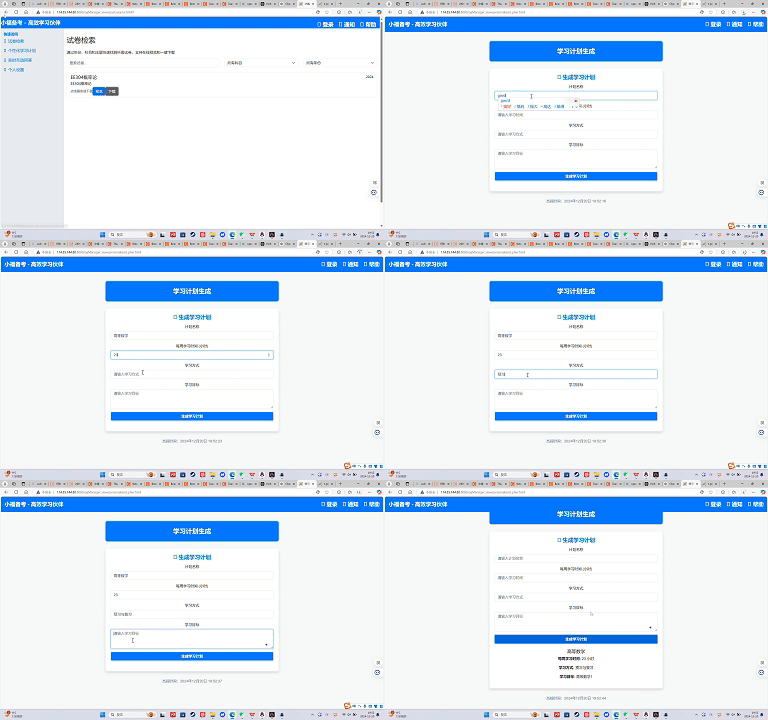
Function6: Learning plan generation
Function7: Full Video
5.Member Harvest
1. Jiang Xiuping:
Task assignment and requirements analysis: Improved understanding of project management and requirements capture by participating in task assignment and software requirements specification documentation, and was able to better coordinate team work.
Front-end and back-end connection testing: Through front-end and back-end connection testing, master the details of front-end and back-end interface interaction, understand the dependencies and troubleshooting between different levels.
2. Wu Xuwei:
Blog publishing and PPT presentation: Through the organization of blog publishing and PPT making, I improved the ability of project communication and presentation, and had a deeper understanding of external communication of the project.
Front-end learning: By learning front-end development, I have mastered the basic front-end technology and framework, laying the foundation for subsequent front-end and back-end collaboration.
Cloud server troubleshooting: Participate in cloud server troubleshooting, which improves system operation and fault diagnosis capabilities in the cloud computing environment.
3. Wang Yuhan:
Create acceptance standards: Through the creation of acceptance standards, I learned how to clarify the standards and quality requirements of project completion, and improved the ability of demand docking and project management.
Full stack development learning: By learning the full stack development process, you have improved your understanding of how front-end and back-end work together and broadened your development skills.
4. Chen Ziyan:
Requirements analysis and planning: Through the analysis of application objectives, service scope and product prospects, the overall perspective of the project from concept to execution is improved, and the long-term development of the project is more in-depth.
5. Li Wenchao:
Data filtering and PPT organizing: Through data processing and PPT making, I enhanced my ability to organize and present information and learned how to effectively display the results of data analysis.
6. Tong Baichuan:
Interface prototyping and front-end development: By designing interface prototypes and writing front-end code, we have deepened our understanding of front-end collaboration and enhanced our front-end development capabilities.
Front-end framework understanding: In the process of writing preliminary front-end code, I got familiar with the use of front-end development framework and tools, and further improved my programming ability.
7. Zhu Jijun:
**Software requirements diagram and database development: **by creating requirements diagrams and developing back-end databases, you learned how to transform business requirements into a number of base structures and improve database design and development capabilities.
8. Lin Wangyang:
Function description and back-end development: By describing software functions and participating in back-end database development, I enhanced my technical accumulation and system architecture thinking in back-end development.
9. Xiong Heng:
Understanding interface prototyping and API documentation: By understanding interface prototyping and API documentation, I improved my skills in front and back end interface definition and documentation, and enhanced my ability to communicate with other developers.
10. Wu Changshu:
Requirement diagram and functional design: By drawing software requirement diagram and designing functional requirements, I have cultivated the ability to transform business requirements into technical requirements, and improved my ability of requirement analysis and system design.
Back-end development: Participate in back-end development, improve the understanding of system architecture and database interaction, and enhance the practical ability of back-end development.
11. Li Shilongyu:
Collection and analysis of user requirements: By collecting and analyzing user requirements, the ability to capture user requirements and connect functions is improved to ensure that project functions meet user expectations.
12. Zheng Yiheng:
Requirements specifications and back-end connection testing: By participating in the writing of requirements specifications and conducting back-end connection testing, I have improved my ability to define requirements and test system integration, ensuring that all parts of the project function seamlessly.
6.Distribute the contribution
| Student Number | Member Name | Task Description | Contribution |
|---|---|---|---|
| 001 | Jiang Xiuping | Task distribution, software requirements specification, PPT creation, frontend-backend connection testing, helped with server restart issue | 9% |
| 002 | Wu Xuwei | Organized and published blogs, PPT presentation, front-end learning, involved in troubleshooting cloud server issue | 9% |
| 003 | Wang Yuhan | Created acceptance criteria, learned full-stack development processes | 9% |
| 004 | Chen Ziyan | Established development intent, analyzed application goals, service scope, and product prospects | 8% |
| 005 | Li Wenchao | Data filtering, PPT creation and sorting | 8% |
| 006 | Tong Baichuan | Determined and introduced interface prototypes, wrote initial front-end code | 8% |
| 007 | Zhu Jijun | Created software requirement diagrams, attributes, backend and database development | 8% |
| 008 | Lin Wangyang | Described software functionalities and developed backend database | 8% |
| 009 | Xiong Heng | Understood interface prototypes, wrote API documentation | 8% |
| 010 | Wu Changshu | Software requirement diagrams, functional requirement design, relationship analysis, backend development | 8% |
| 011 | Li Shilongyu | Collected and analyzed user needs to ensure functional alignment | 8% |
| 012 | Zheng Yiheng | Software requirements specification, PPT creation, frontend-backend connection testing | 9% |
相关推荐
弱电网下光伏并网逆变器序阻抗建模仿真复现扫频法【序阻抗判断稳定性】
内容概要:本文聚焦于弱电网条件下光伏并网逆变器的序阻抗建模与稳定性分析,系统阐述了基于扫频法的阻抗特性仿真与复现方法。通过构建正负序阻抗模型,深入剖析逆变器在弱电网环境中的动态响应特性,结合锁相环、电流环等关键控制环节对系统阻抗的影响机制,采用序阻抗稳定性判据评估多机并网或复杂电网条件下的系统稳定裕度。研究在Simulink平台中实现激励信号注入、频率响应采集与阻抗曲线绘制,为高比例新能源接入背景下并网系统的稳定性分析提供了可靠的仿真手段与理论支撑,尤其适用于SCI级别论文成果的复现与拓展验证。; 适合人群:电力电子、新能源并网技术及相关领域的硕士/博士研究生、科研人员,以及从事光伏逆变器、微电网稳定控制开发的工程技术人员。; 使用场景及目标:①掌握扫频法在电力电子装置阻抗建模中的具体实施流程;②理解并应用基于序阻抗的稳定性判据进行系统稳定边界分析;③用于高水平学术论文(如SCI期刊)中阻抗建模与稳定性分析部分的仿真复现与方法验证; 阅读建议:建议读者结合文中所述方法与提供的参考文献,自主搭建Simulink仿真模型,逐步完成扰动信号设计、数据采集、傅里叶分析及阻抗拟合全过程,深入探究控制参数变化对系统阻抗特性和稳定性的具体影响,强化理论与实践的融合能力。
三相并网逆变器虚拟阻抗+统一有源阻尼策略SVPWM+SPWM调制仿真
内容概要:本文档系统性地介绍了三相并网逆变器的核心控制技术及其在复杂电网环境下的仿真应用,重点涵盖虚拟阻抗与统一有源阻尼策略在SVPWM和SPWM调制方式下的实现方法,旨在提升逆变器的稳定性与电能质量。内容包括无功功率扰动孤岛检测、中点电位平衡控制、低电压穿越(LVRT)、模型预测控制(MPC)、正负序分离、电网前馈控制等关键技术,并扩展至风储联合调频、微电网下垂控制、虚拟同步发电机(VSG)、构网型逆变器等多种典型电力系统应用场景。所有技术均配有基于Simulink/Matlab平台的完整仿真模型、参考文献及说明文档,强调理论分析与仿真实践的深度融合,突出科研中“借力”与创新思维的重要性。; 适合人群:电气工程、自动化、新能源等相关专业的研究生、科研人员及从事电力电子与可再生能源系统开发的工程师;具备MATLAB/Simulink仿真基础和电力系统专业知识的技术人员。; 使用场景及目标:①开展三相并网逆变器控制策略的研究与优化设计;②复现高水平学术论文中的控制算法;③完成毕业课题、科研项目或工程仿真验证;④掌握虚拟阻抗、有源阻尼、SVPWM/SPWM调制、MPC、VSG等核心技术的建模与实现方法;⑤支撑微电网、构网型变流器等前沿方向的科研攻关。; 阅读建议:建议按照资源目录结构化学习,优先选择与自身研究方向契合的内容模块,结合提供的仿真模型、参考文献和说明材料进行实操演练,注重从理论推导到仿真实现的全过程理解,充分利用共享网盘资源深化技术掌握,提升科研效率与创新能力。
chromedriver-win32-159.0.8133.0(Canary).zip
chromedriver-win32-159.0.8133.0(Canary).zip
计算机“101计划”《人工智能引论》教学大纲+课件+实训案例
计算机“101计划”《人工智能引论》教学大纲+课件+实训案例
语音输入法离线语音输入转文字工具2.0支持双档本地识别模型,中英混说精准转写,纯离线运行保护隐私,让打字更高效.zip
大家好,我是大飞哥。日常打字时,频繁切换输入法、断网无法语音转写、或担心语音数据被传至云端,是许多办公族和内容创作者的共同痛点。这款离线语音输入工具 ,正是为此量身打造的 Windows 桌面语音辅助利器。它的核心使命就是按住快捷键说话,松开文字自动上屏,全程本地离线识别,让您在任何可输入文字的窗口内都能实现高效、私密的语音输入,彻底告别网络依赖与隐私焦虑。 在核心功能上,软件内置了两档本地语音识别模型,通过主界面下拉框即可随时切换。默认的“离线·标准”模式响应极快,支持中英混说且自带标点,非常适合日常聊天与文档撰写;而“离线·精准”模式则对纯中文、方言口音及长段落口述的识别准确度更高。更贴心的是,它具备实时预览与一键取消机制,说话过程中若发现说错,按下 Esc 即可取消,一个字都不会误输入;若目标窗口不支持直接写入,文字会自动存入剪贴板,方便您按 Ctrl+V 粘贴,确保每次发声都不白费。 这款工具在具体场景中的表现十分亮眼。对于办公白领,在填写表格、撰写邮件或使用微信、QQ 沟通时,无需频繁切换窗口,按住右键说话即可快速完成信息录入;对于程序员与文字工作者,在代码编辑器或文档中口述注释与段落,能显著提升创作效率;对于经常出差的商务人士,在飞机、高铁等断网环境下,它依然能稳定工作,不经过任何服务器,真正做到了“说了什么只有自己知道”,私密性极佳。 使用体验方面,软件将极简操作贯彻到底。解压后双击 大飞哥语音输入,右下角托盘出现蓝色话筒图标即代表准备就绪。用户只需将光标点进目标输入框,按住右 Alt说话,说完松开,文字便会自动写入。主界面提供了设置快捷键与开机自动启动选项,方便用户按习惯自定义组合键;关闭主窗口并不会退出程序,而是缩至托盘持续待命,彻底退出只需右键托盘或点击主界面按钮,逻辑清晰,零门槛上手。




