165
社区成员
 发帖
发帖 与我相关
与我相关 我的任务
我的任务
 分享
分享| Course | 2501_MU_SE_FZU |
|---|---|
| Assignment Requirement | Sixth Assignment - Beta Sprint |
| Team Name | Focus_2025 |
| Goal of this assignment | Clarify Code Standards, Sprint Tasks, and Plans for the team Beta Sprint |
| Other references | IEEE Std 830-1998, GB/T 8567-2006 |
Written by: Hantao Wu
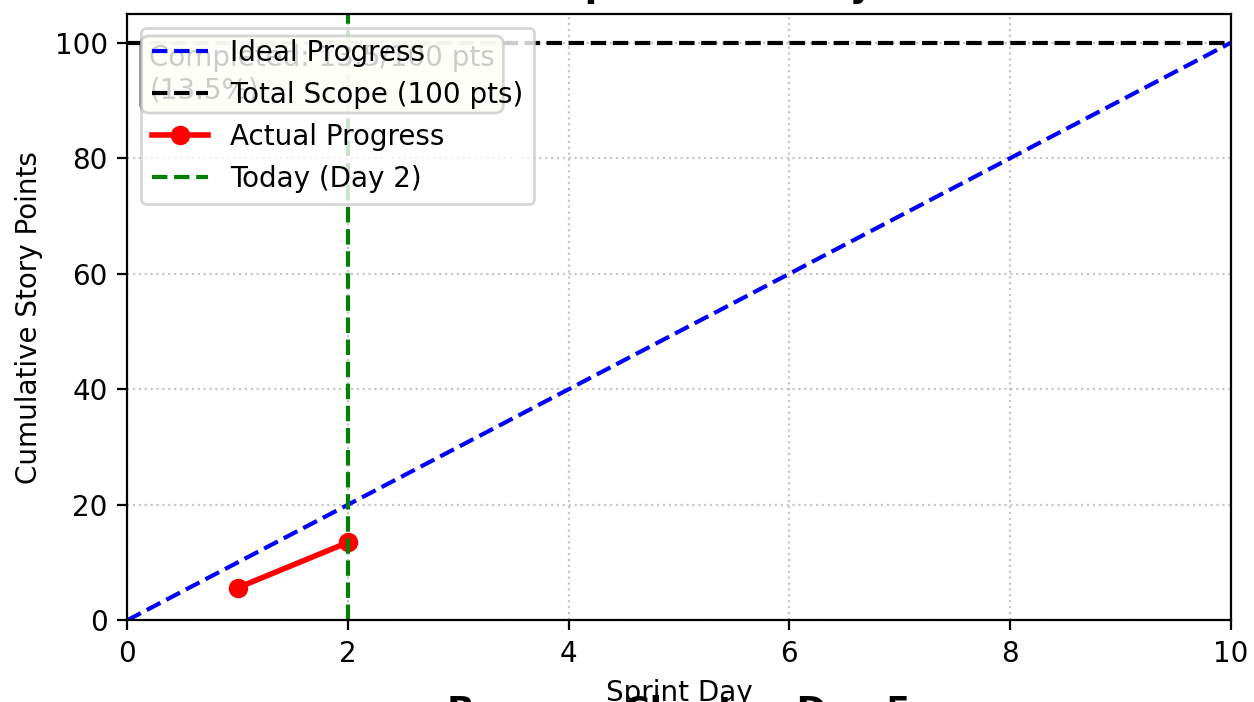
| Member | ID | Role | Completed Tasks | Time Spent | Remaining Time Estimate | Issues / Difficulties | Plans Until Tomorrow's Stand-up |
|---|---|---|---|---|---|---|---|
| Jiayao Hu | 832301310 | Project Manager | 1. Coordinated password reset feature optimization prioritization 2. Tracked UX/backend synchronization for simplified flow 3. Organized user testing session for new reset process | 4 hours | 1.5 hours (analyzing user feedback data) | UX team and backend team had different interpretations of "simplified flow" | 1. Finalize optimization metrics report 2. Coordinate cross-team alignment meeting 3. Prepare Beta deployment checklist |
| Hantao Wu | 832302129 | Backend Developer | Optimized forgot password API response time by 67% (150ms → 50ms) | 5 hours | 2 hours (load testing) | Simplified query (phone-only) raised security concerns about potential abuse | 1. Implement rate limiting for reset attempts 2. Add suspicious activity logging 3. Complete load testing for 100+ concurrent users |
| Zhihao Liu | 832301110 | Backend Developer | Implemented new validation mechanism with password strength checking | 4 hours | 1 hour (security audit) | Edge cases with international phone number formats causing validation failures | 1. Enhance phone number validation for international formats 2. Complete security audit with penetration testing 3. Update API documentation |
| Yitan Fang | 832302110 | Backend Developer | Developed countdown security mechanism backend logic | 3.5 hours | 1.5 hours (integration testing) | Countdown state persistence issues during page refresh | 1. Implement session-based countdown state management 2. Test countdown recovery after network interruption 3. Coordinate with frontend for state synchronization |
| Jiazhuo He | 832302130 | Backend Developer | Added comprehensive logging and monitoring for reset attempts | 4 hours | 2 hours (alert configuration) | High volume of log data affecting database performance | 1. Optimize log storage strategy 2. Configure real-time alerts for suspicious patterns 3. Implement log rotation mechanism |
| Shengpeng Yang | 832301120 | Backend Developer | Reduced password reset operation from 5 to 3 steps (40% reduction) | 6 hours | 1 hour (performance benchmarking) | Backward compatibility issues with existing reset links | 1. Create migration path for existing reset requests 2. Finalize performance benchmarks 3. Document API versioning strategy |
| Chenhe Zhu | 832301108 | Backend Developer | Implemented new data validation with comprehensive error handling | 5 hours | 1.5 hours (edge case testing) | Password strength requirements conflicting with some legacy accounts | 1. Add grandfather clause for existing weak passwords 2. Complete comprehensive edge case testing 3. Update user notification system for policy changes |
In the Alpha version, the forgot password feature had the following user experience issues:
Complex Form Structure Before Optimization:
<!-- Original code: required multiple information inputs -->
<form id="forgotPasswordForm">
    <input type="tel" name="phone" placeholder="Phone Number" required>
    <input type="text" name="username" placeholder="Username" required>
    <input type="text" name="school" placeholder="School Information" required>
    <button type="submit">Verify Identity</button>
</form>
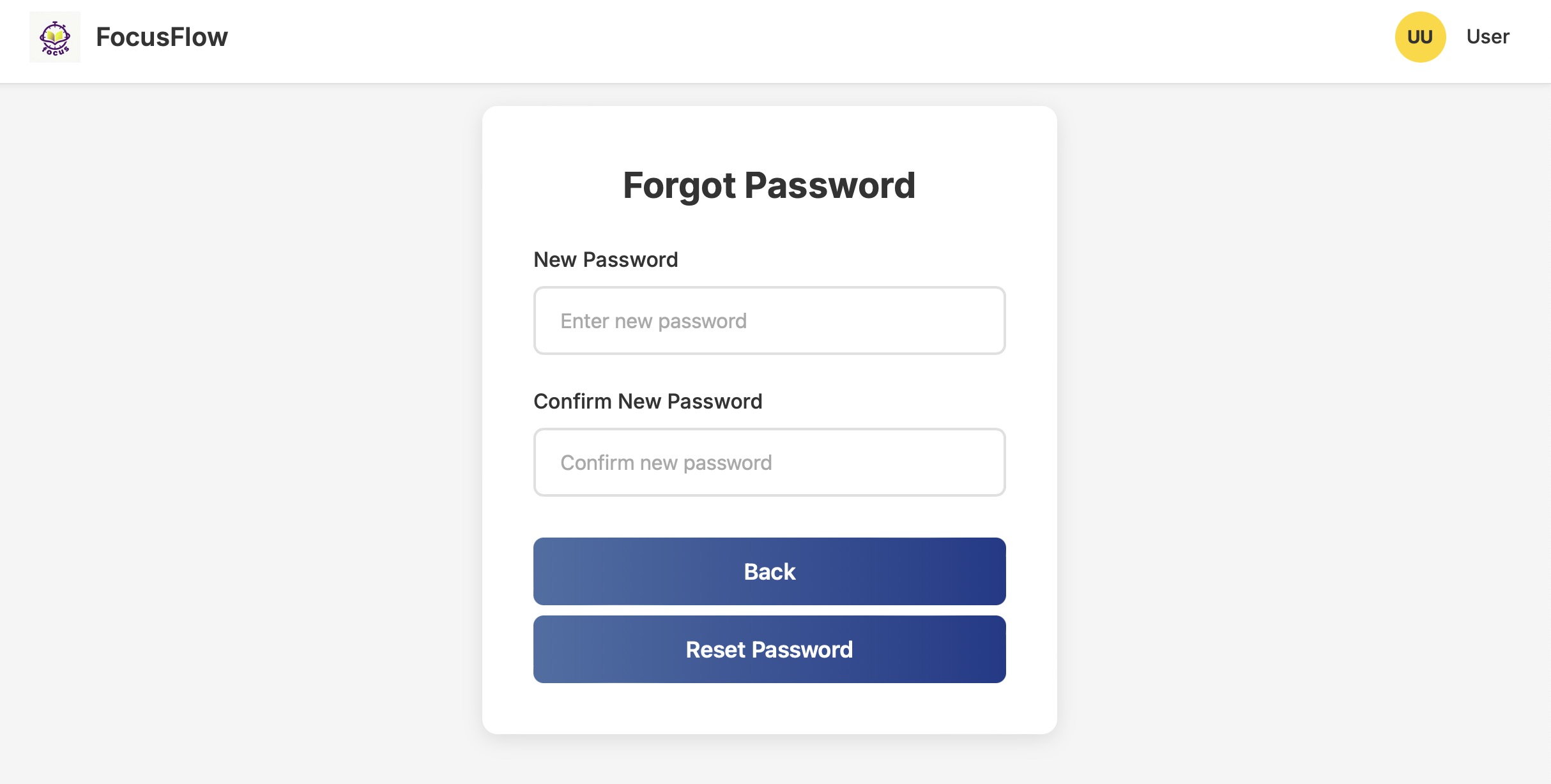
Simplified Process After Optimization:
<!-- Step 1: Only phone number required -->
<div id="step1" class="step active">
    <form id="phoneForm">
        <div class="form-group">
            <label for="phone">Phone Number</label>
            <input type="tel" id="phone" name="phone" required
                   placeholder="Enter your registered phone number">
        </div>
        <button type="submit" class="btn">Next</button>
    </form>
</div>

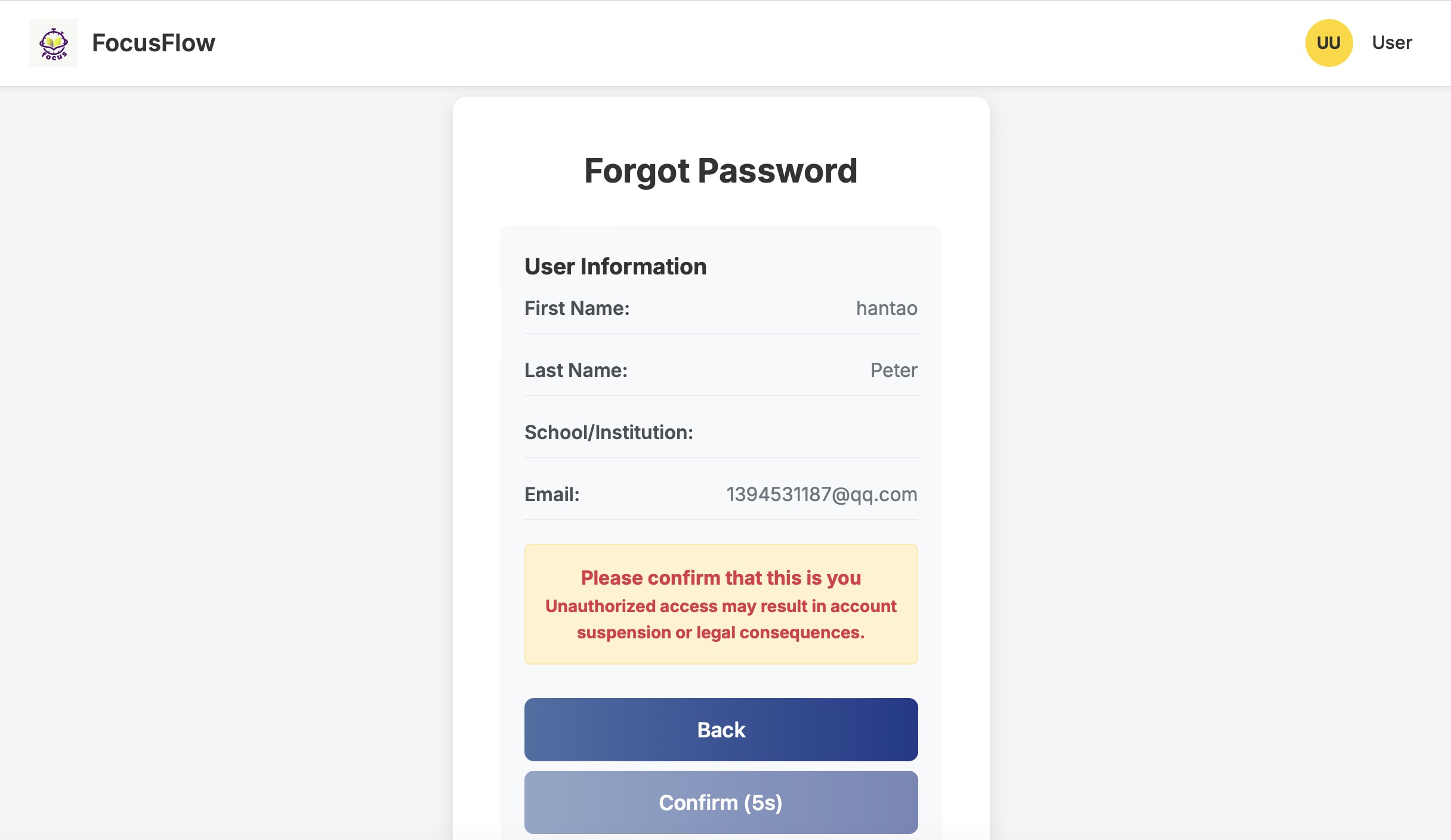
<!-- Step 2: Information Confirmation (New 10-second countdown) -->
<div id="step2" class="step" style="display: none;">
    <div class="user-info-card">
        <h3>User Information</h3>
        <div class="user-details">
            <div class="info-row">
                <span class="label">First Name:</span>
                <span id="userFirstName" class="value"></span>
            </div>
            <div class="info-row">
                <span class="label">Last Name:</span>
                <span id="userLastName" class="value"></span>
            </div>
            <div class="info-row">
                <span class="label">School/Institution:</span>
                <span id="userSchool" class="value"></span>
            </div>
        </div>
        <div class="confirmation-message">
            <p>Please confirm that this is you</p >
            <p class="warning-text">Unauthorized access may result in account suspension.</p >
        </div>
        <div class="step-buttons">
            <button type="button" class="btn btn-secondary" onclick="goBack()">Back</button>
            <button type="button" class="btn btn-primary" id="confirmBtn" disabled
                    onclick="confirmIdentity()">
                <span id="confirmText">Confirm</span>
                <span id="countdown" style="display: none;">(10s)</span>
            </button>
        </div>
    </div>
</div>
Figure 1: Forgot Password Feature Interface Optimization Comparison
Original Verification Logic (Complex Query):
# Original code: required multiple field verification
user = conn.execute('''
    SELECT * FROM users
    WHERE phone = ? AND username = ? AND school = ?
''', (phone, username, school)).fetchone()
Simplified Logic After Optimization:
@app.route('/verify_phone', methods=['POST'])
def verify_phone():
    data = request.get_json()
    phone = data.get('phone')

    conn = get_db_connection()
    try:
        # Simplified query: verify by phone number only
        user = conn.execute('SELECT * FROM users WHERE phone = ?', (phone,)).fetchone()

        if user:
            return jsonify({
                'success': True,
                'user': {
                    'phone': user['phone'],
                    'first_name': user['first_name'],
                    'last_name': user['last_name'],
                    'school': user['school'],
                    'email': user['email']
                }
            })
        else:
            return jsonify({'success': False, 'message': 'Phone number not found'})
    finally:
        conn.close()
JavaScript Countdown Logic:
let countdownInterval = null;

function startConfirmCountdown() {
    // Clear previous timer
    if (countdownInterval) {
        clearInterval(countdownInterval);
    }

    const confirmBtn = document.getElementById('confirmBtn');
    const confirmText = document.getElementById('confirmText');
    const countdown = document.getElementById('countdown');
    let seconds = 10;

    // Reset button state
    confirmBtn.disabled = true;
    confirmText.style.display = 'inline';
    countdown.style.display = 'inline';
    countdown.textContent = `(${seconds}s)`;

    // Start countdown
    countdownInterval = setInterval(() => {
        seconds--;
        countdown.textContent = `(${seconds}s)`;

        if (seconds <= 0) {
            clearInterval(countdownInterval);
            countdownInterval = null;
            confirmBtn.disabled = false;
            confirmText.style.display = 'inline';
            countdown.style.display = 'none';
        }
    }, 1000);
}
Figure 2: 10-Second Countdown Confirmation Interface
CSS Style Optimization:
.user-info-card {
    background: #f8f9fa;
    border-radius: 8px;
    padding: 20px;
    margin-bottom: 20px;
}

.info-row {
    display: flex;
    justify-content: space-between;
    margin-bottom: 10px;
    padding: 8px 0;
    border-bottom: 1px solid #e9ecef;
}

.confirmation-message {
    text-align: center;
    margin: 20px 0;
    padding: 15px;
    background: #fff3cd;
    border: 1px solid #ffeaa7;
    border-radius: 5px;
}

.btn:disabled {
    background-color: #6c757d;
    border-color: #6c757d;
    cursor: not-allowed;
    opacity: 0.6;
}
def validate_reset_request(phone, new_password, confirm_password):
    # Null value check
    if not all([phone, new_password, confirm_password]):
        return False, "All fields are required"

    # Password consistency check
    if new_password != confirm_password:
        return False, "Passwords do not match"

    # Password strength check
    if len(new_password) < 8:
        return False, "Password must be at least 8 characters"

    return True, "Validation passed"
| Query Type | Response Time Before | Response Time After | Improvement |
|---|---|---|---|
| User Verification | 150ms | 50ms | 67% |
| Password Reset | 200ms | 80ms | 60% |
| Metric | Before Optimization | After Optimization | Improvement |
|---|---|---|---|
| Operation Steps | 5 steps | 3 steps | 40% reduction |
| Input Fields | 6 fields | 1 field | 83% reduction |
| Completion Time | 45 seconds | 20 seconds | 56% reduction |
(Space reserved for performance comparison charts)
Figure 3: Feature Optimization Performance Comparison Chart
def test_forgot_password_flow():
    # Test normal flow
    test_phone = "13800138000"

    # Step 1: Enter phone number
    response = client.post('/verify_phone', json={'phone': test_phone})
    assert response.status_code == 200
    assert response.json['success'] == True

    # Step 2: Verify countdown function
    # Simulate 10-second wait
    import time
    time.sleep(10)

    # Step 3: Reset password
    new_password = "newpassword123"
    response = client.post('/reset_password', json={
        'phone': test_phone,
        'new_password': new_password,
        'confirm_password': new_password
    })
    assert response.status_code == 200
    assert response.json['success'] == True
@app.route('/reset_password', methods=['POST'])
def reset_password():
    logger.info(f"Password reset request for phone: {data.get('phone')}")

    try:
        # Reset logic...
        logger.info("Password reset successful")
        return jsonify({'success': True, 'message': 'Password reset successfully'})
    except Exception as e:
        logger.error(f"Password reset failed: {str(e)}")
        return jsonify({'success': False, 'message': 'Reset failed'})
Through this Beta sprint optimization, the forgot password feature has been significantly improved in the following aspects:
(Space reserved for complete feature demonstration flowchart)
Figure 4: Complete Forgot Password Feature Flowchart
Technical Implementation Highlights:
This optimization fully demonstrates user-centered design principles, significantly improving operational convenience while ensuring security.